A Warehouse Management System (WMS) is software that helps businesses manage inventory, storage locations, receiving, putaway, replenishment, picking, packing, and shipping. By coordinating warehouse transactions and maintaining structured inventory records, a WMS helps organizations improve stock visibility, order fulfillment, and operational control.
Modern warehouse management software can support manual warehouses, multi-site distribution networks, and automated facilities using automated storage and retrieval systems (AS/RS), shuttle systems, conveyors, and mobile robots. The best WMS depends on warehouse complexity, transaction volume, integration requirements, and the level of automation.
For companies planning warehouse improvements, understanding how a WMS works, what advanced features it offers, and how it integrates with ERP, WCS, and physical handling equipment is essential to selecting a suitable solution.
This guide explains WMS functions, provides a practical warehouse management system example, compares software capabilities, and outlines how to choose the right WMS for your operation.
1. What Is a Warehouse Management System (WMS)?
A Warehouse Management System is a software application designed to manage and control warehouse operations. It maintains inventory information, supports warehouse task execution, and records material movements from receiving through storage and outbound fulfillment.
A WMS can help warehouse teams answer questions such as:
-
What inventory is available, and where is it stored?
-
Which goods should be received, put away, or replenished?
-
Which orders need to be picked and shipped?
-
Which storage locations are suitable for incoming products?
-
Which warehouse tasks remain incomplete?
-
Do recorded inventory movements match confirmed physical operations?
A WMS may use barcode scanning, RFID, mobile terminals, sensors, or interfaces with automated equipment to capture transaction data. Available functions vary by software product and implementation.
The main purpose of a WMS is to manage warehouse inventory and workflows using reliable, structured operational data. It can improve visibility and consistency, but results depend on accurate master data, correct transactions, effective procedures, and suitable system integration.
2. Core Functions of WMS Management Software
WMS management software supports the main warehouse processes through a shared operational record. The functions below are common, although the exact capabilities vary by product.
2.1 Inventory Management
Inventory management is one of the central functions of a WMS. The system maintains records of stock quantities and locations and may also track attributes such as lot numbers, serial numbers, expiration dates, ownership, and inventory status.
Depending on the configuration, inventory may be classified as available, reserved, damaged, quarantined, or allocated to an order.
A WMS helps warehouse teams identify discrepancies, locate stock, and manage inventory movements through defined transactions. Real-time or near-real-time visibility depends on the frequency and reliability of data capture and system communication.
2.2 Receiving and Putaway
Receiving functions record incoming goods and compare them with expected receipts or purchase information where the relevant interfaces are available.
After receipt, the WMS may recommend a storage location based on configured rules, such as product compatibility, dimensions, weight, temperature requirements, turnover, or available capacity.
Putaway rules can help reduce unnecessary movement and make better use of warehouse space. The assigned location must also be compatible with the physical storage equipment and operational constraints.
2.3 Storage Location Management
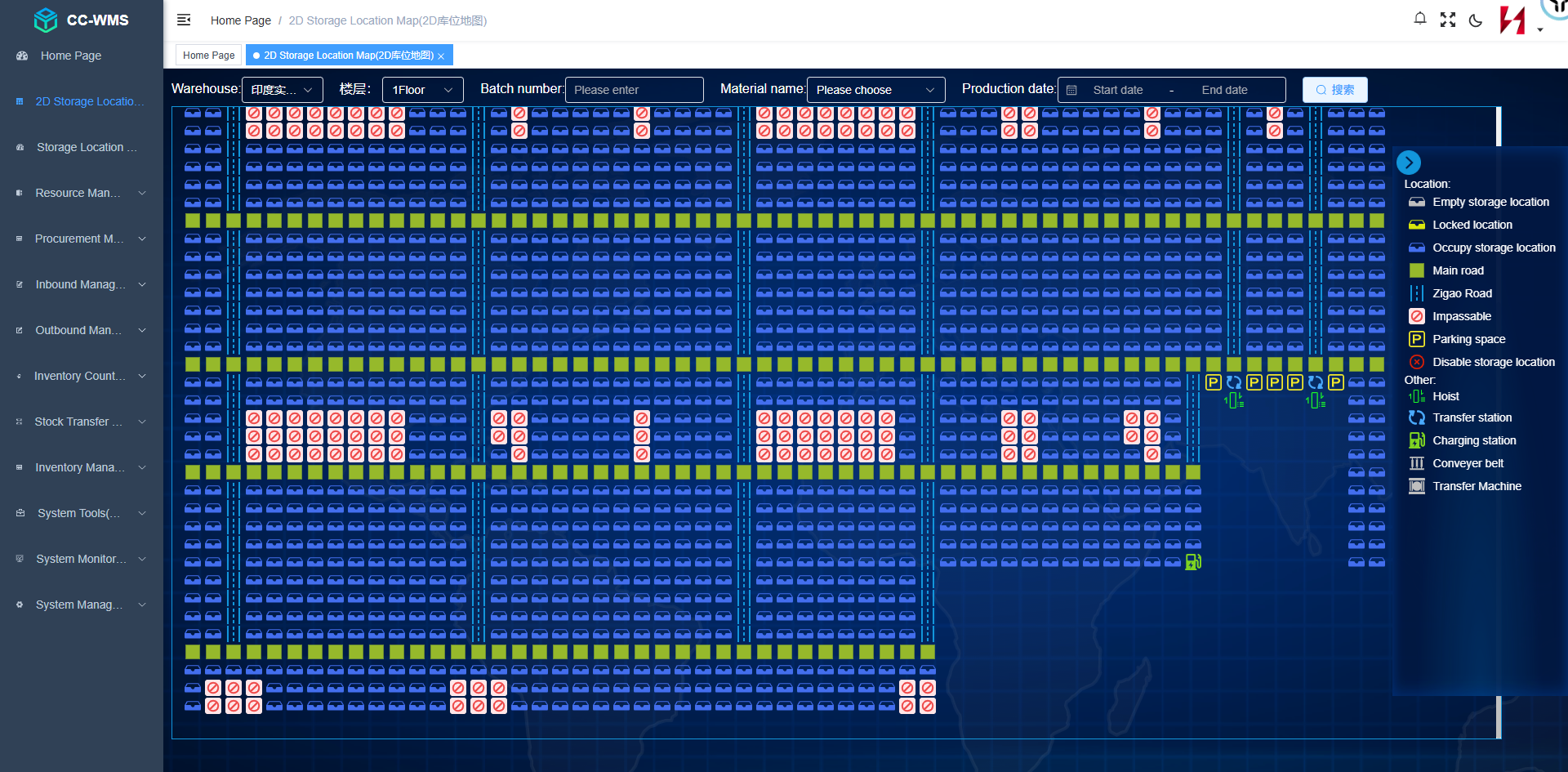
A WMS can maintain a digital representation of warehouse locations, including zones, aisles, racks, bays, levels, bins, and other location identifiers.
Location rules may consider:
-
Product dimensions and weight.
-
Load-carrier type.
-
Storage compatibility.
-
Available capacity.
-
Inventory rotation requirements.
-
Picking frequency.
-
Hazardous-material or environmental restrictions, where applicable.
In automated warehouses, location data must be consistent with the location model used by the equipment-control architecture. Otherwise, software may assign stock to locations that are unavailable or physically inaccessible.
2.4 Replenishment
Replenishment moves inventory from reserve storage to picking or forward-picking locations.
A WMS can generate replenishment tasks based on configured minimum quantities, order demand, picking activity, or other business rules.
Effective replenishment helps maintain product availability at picking stations and reduces interruptions caused by empty pick locations. The right strategy depends on order patterns, storage layout, and the relationship between reserve storage and picking capacity.
2.5 Order Picking and Fulfillment
A WMS organizes picking work according to order requirements and configured operating rules.
Depending on the system, supported strategies may include:
-
Discrete order picking.
-
Batch picking.
-
Zone picking.
-
Wave picking.
-
Cluster picking.
-
Goods-to-person workflows.
The most suitable strategy depends on SKU characteristics, order profiles, labor organization, equipment, and required dispatch times.
In an automated warehouse, the WMS may release or coordinate picking-related tasks through connected systems. Robotic piece picking or automated pallet retrieval generally requires suitable equipment and interfaces beyond inventory management alone.
2.6 Packing, Shipping, and Dispatch
A WMS may support packing verification, shipment consolidation, carton or pallet identification, dispatch staging, and shipment confirmation.
Where integrated with transportation management, carrier systems, or ERP, it may also exchange shipment information and shipping instructions.
The exact scope varies. A WMS should not be assumed to replace a transportation management system or carrier platform unless those functions are explicitly included.
2.7 Cycle Counting and Inventory Accuracy
Cycle counting allows inventory to be checked on a planned or exception-driven basis without necessarily conducting a full warehouse shutdown.
A WMS can schedule counts by location, SKU, inventory value, transaction frequency, or configured risk criteria. It can record count results and route discrepancies for investigation or approval.
System records are only as reliable as the transactions and checks that support them. A WMS helps establish control, but it cannot independently guarantee that every physical movement has been recorded correctly.
2.8 Reporting and Operational Analytics
WMS reporting can help managers review inventory, orders, task completion, and warehouse productivity.
Common metrics include:
-
Inventory record accuracy.
-
Order-picking accuracy.
-
Receiving and putaway cycle time.
-
Order fulfillment lead time.
-
Lines or units picked per labor hour.
-
On-time dispatch rate.
-
Inventory turnover.
-
Space utilization.
Metrics should have clearly defined calculation methods and data sources. Comparing results over time is more meaningful when measurement rules remain consistent.
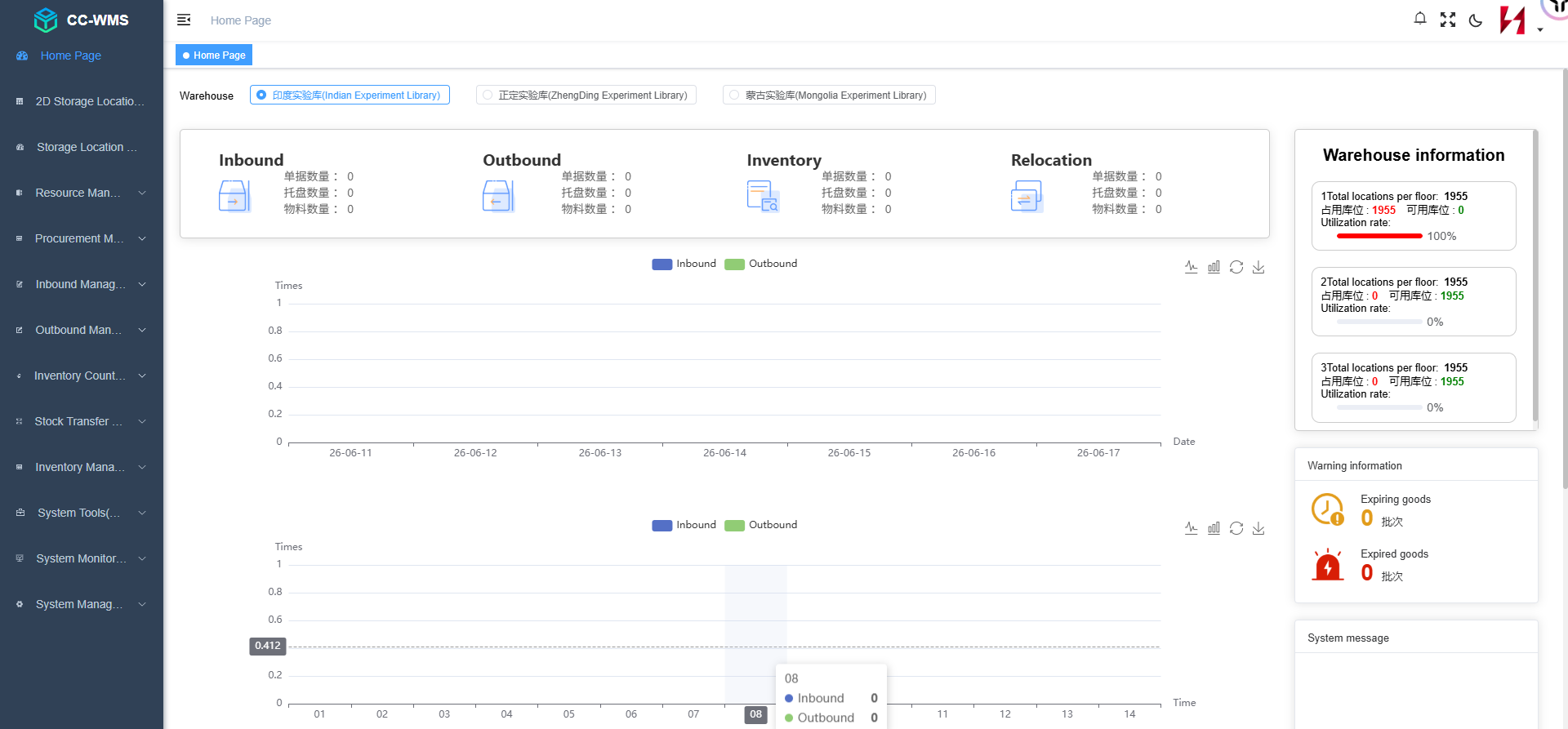
3. How Does a WMS Work?
A WMS typically supports warehouse operations through a sequence of transactions and task updates.
Step 1: Receive Order and Inventory Information
The system receives relevant information from ERP, an order management system, a manufacturing system, or another configured source. This may include expected receipts, customer orders, product data, and inventory requirements.
Step 2: Register Incoming Goods
Warehouse staff or automated identification equipment capture the required product and receipt information. The system records the receipt according to its configured business rules.
Step 3: Assign a Storage Location
The WMS selects or recommends a suitable location based on inventory rules, capacity, compatibility, and available location data.
In an automated warehouse, the location assignment must also comply with the capabilities and constraints of the storage system.
Step 4: Execute Putaway
The putaway task is performed manually or through connected material-handling equipment. The system receives relevant confirmation, such as a scan or equipment status update, depending on the workflow.
Step 5: Maintain Inventory Records
Once the required transaction conditions are met, the WMS updates the relevant inventory records and makes the information available to authorized users and connected systems.
Step 6: Allocate and Release Orders
When an order is ready for processing, the WMS determines the inventory and tasks needed according to configured allocation and fulfillment rules.
Step 7: Pick, Pack, and Dispatch
Warehouse workers or automated equipment execute the relevant tasks. The WMS records confirmations and exceptions and updates the order's progress.
Step 8: Reconcile and Analyze Performance
Operational reports help teams identify discrepancies, delays, and recurring bottlenecks. Managers can use the results to adjust procedures, replenishment rules, and task priorities.
This workflow is illustrative. Actual transaction sequences differ according to warehouse processes, software configuration, and integration architecture.
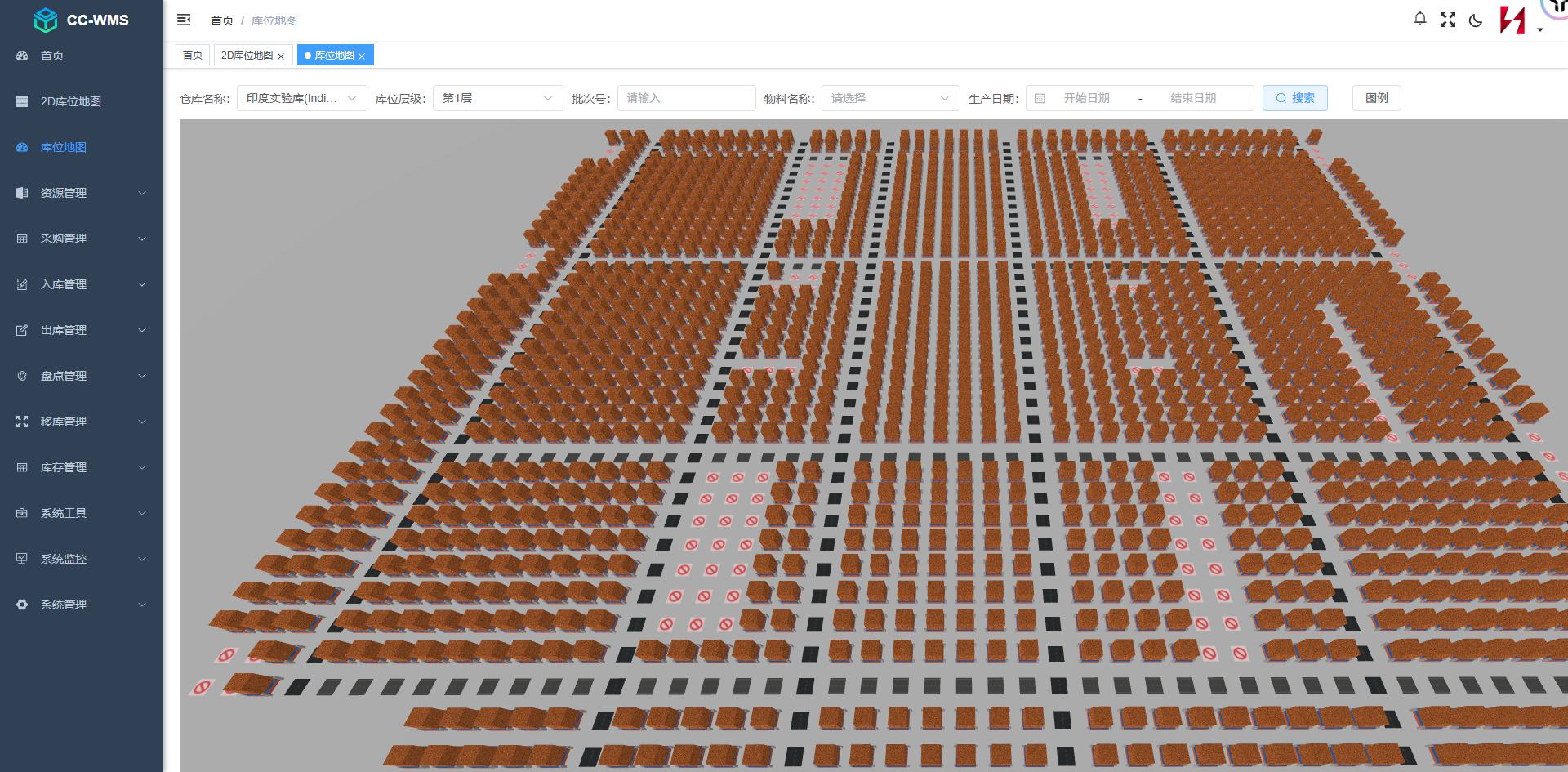
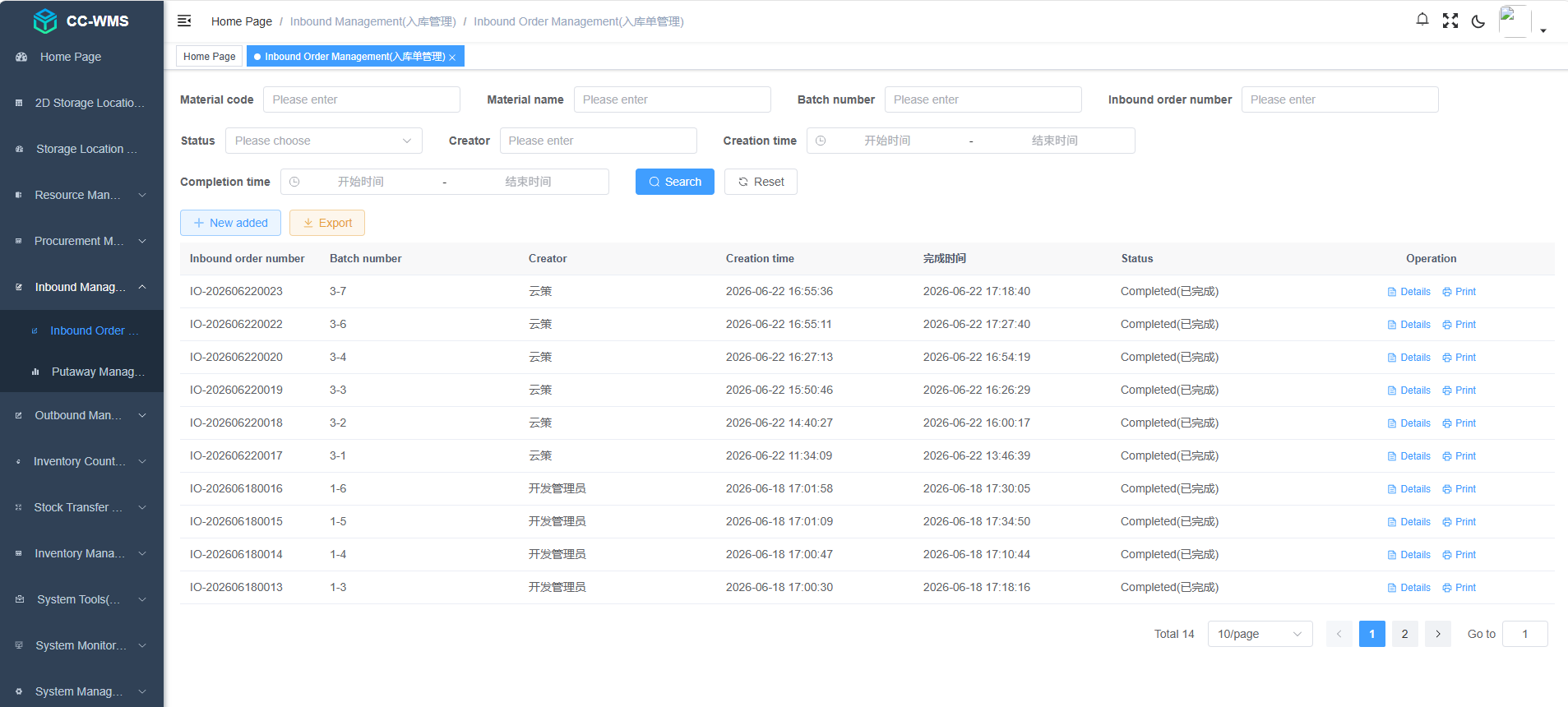
4. Warehouse Management System Sample: A Practical Example
A warehouse management system sample helps businesses understand how WMS software supports daily operations. Consider a distribution warehouse that receives pallets, stores products in designated locations, and fulfills customer orders.
Example: From Receiving to Shipping
1. Receiving: A shipment arrives with 100 cartons of a particular SKU. The warehouse operator scans the relevant product or shipment identifiers.
2. Inventory registration: The WMS records the receipt after the required checks. The received quantity is available for the next eligible warehouse process according to the configured transaction rules.
3. Putaway: The system assigns or recommends a suitable location based on product requirements, capacity, and warehouse rules.
4. Inventory tracking: The WMS maintains the stock record and records subsequent movements when the required transactions are confirmed.
5. Order allocation: A customer places an order for 20 cartons. The WMS checks eligible inventory and creates the required warehouse tasks.
6. Picking and replenishment: A worker or connected automation system retrieves the required quantity. If the picking location lacks sufficient stock, the configured replenishment process can generate a replenishment task.
7. Packing and shipping: The order is checked, packed, staged, and confirmed for dispatch.
8. Reporting: Warehouse managers can review the received quantity, picked quantity, remaining stock, inventory location, and order status.
The quantities in this example are illustrative, not a benchmark or a claim about any particular software product.
Sample WMS Inventory Report
| SKU | Location | Recorded quantity | Allocated quantity | Available quantity |
| SKU-A | A-01-02 | 100 | 20 | 80 |
| SKU-B | B-03-01 | 60 | 15 | 45 |
| SKU-C | C-02-04 | 40 | 10 | 30 |
Illustrative data only. Available quantity is calculated here as recorded quantity minus allocated quantity; actual systems may apply additional inventory-status and allocation rules.
A useful WMS sample should demonstrate how the system tracks inventory, locations, order allocations, and transaction status. When evaluating software, businesses should request a demonstration using their own product types, order patterns, and warehouse processes.
In an automated warehouse, the WMS may exchange tasks and status information with a WCS or equipment-control layer. For example, a storage retrieval request can initiate a coordinated workflow involving an AS/RS, shuttle system, lift, or conveyor. The system should distinguish between a requested movement and a physically confirmed transaction.
5. Types of Warehouse Management Systems
WMS products can be classified in several ways. The following categories describe common deployment models and functional approaches rather than mutually exclusive product types.
5.1 Standalone WMS
A standalone WMS focuses on warehouse operations and integrates with external ERP, order management, transportation, or automation systems as required.
It may suit companies that need dedicated warehouse functions without replacing their wider business-management platform.
5.2 ERP-Integrated WMS
Some ERP platforms include warehouse-management functions or offer a connected WMS module.
This approach may simplify data exchange with purchasing, sales, finance, and manufacturing. However, businesses should verify whether the warehouse functions support their operational complexity, automation requirements, and expected transaction volumes.
5.3 Cloud-Based WMS
A cloud-based WMS is delivered through cloud infrastructure, subject to the vendor's architecture and service model.
Potential advantages include centralized administration and reduced need to maintain certain local infrastructure components. Evaluation should include network dependency, security, availability, integration, subscription costs, and data-governance requirements.
5.4 On-Premises WMS
An on-premises WMS is deployed on infrastructure managed by the organization or its service provider.
This may suit businesses with specific infrastructure, governance, or integration requirements. The organization must also account for infrastructure maintenance, upgrades, backup, and disaster recovery.
5.5 WMS for Automated Warehouses
A WMS designed for automated warehouse operations manages inventory and warehouse transactions while exchanging tasks or data with equipment-control systems.
Its suitability depends on supported interfaces, transaction logic, location mapping, exception handling, and the ability to coordinate with the selected automation architecture.
A system's label alone does not establish that it can control a particular shuttle, crane, lift, or robot. Compatibility must be confirmed for the actual project.
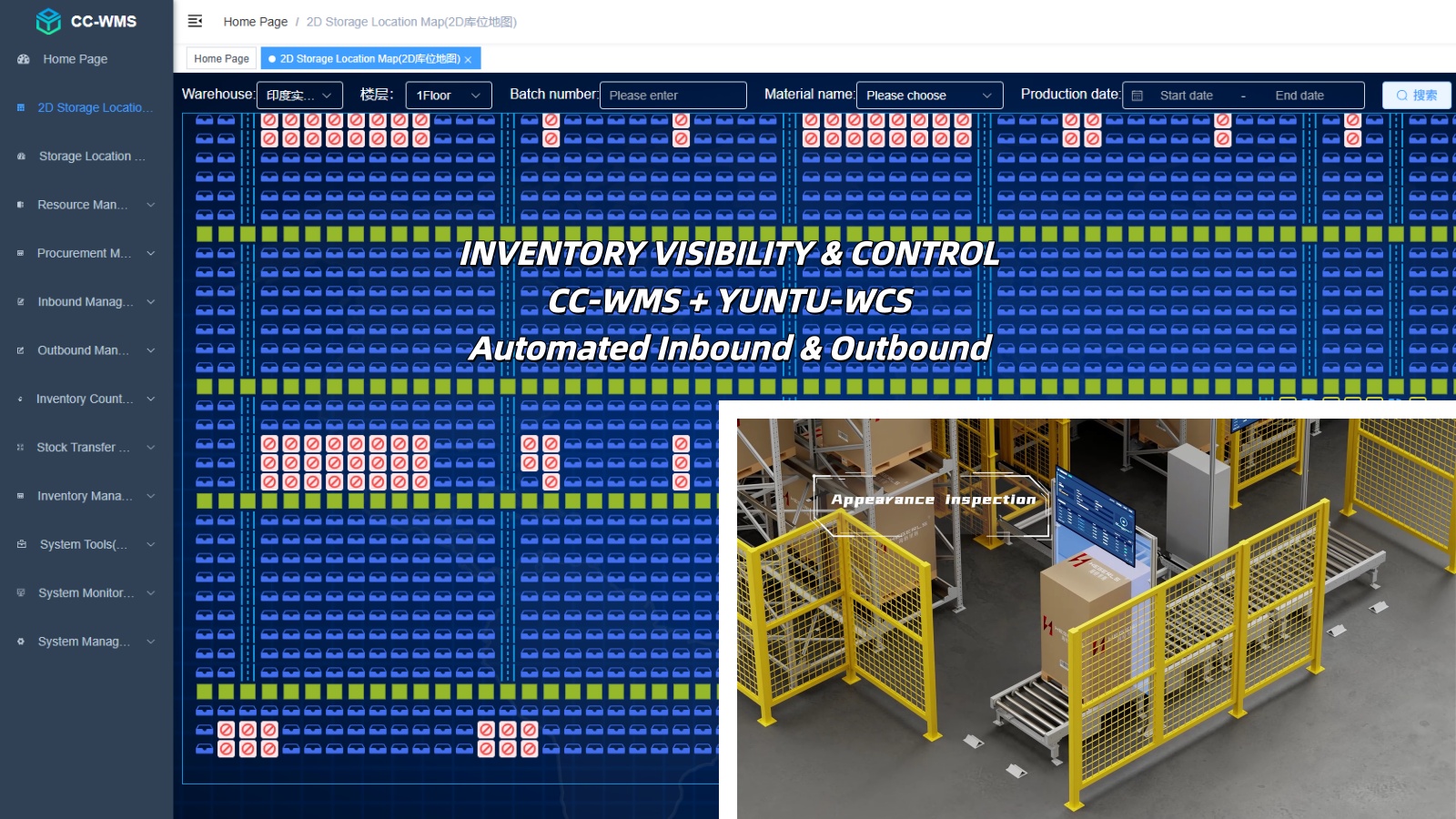
6. Top WMS Management Software: How to Compare the Best Solutions
The best warehouse management system (WMS) is not necessarily the one with the most features. It is the system that best matches a company's inventory requirements, warehouse workflows, integration needs, and long-term business goals.
When evaluating top WMS management software, businesses should look beyond general rankings and compare practical capabilities, implementation requirements, scalability, and total cost of ownership. The right choice depends on the warehouse's size, order profile, operational complexity, and level of automation.
The following criteria can help you identify the best warehouse management system for your specific operation.
Best Warehouse Management System: How to Choose the Right Solution
When evaluating the best warehouse management system, focus on five essential criteria:
-
Inventory management: Can the system track stock quantities, storage locations, inventory status, and lot or serial numbers where required?
-
Workflow capabilities: Does it support receiving, putaway, replenishment, picking, packing, shipping, and cycle counting?
-
Integration: Can it exchange data with ERP, MES, order management, and other relevant business systems?
-
Scalability and reporting: Can it accommodate growing order volumes, additional warehouse locations, and more complex operations while providing useful performance reports?
-
Implementation and cost: Are deployment, training, customization, maintenance, and ongoing support appropriate for your budget and operational needs?
For automated warehouses, also verify compatibility with AS/RS, four-way shuttle systems, conveyors, lifts, and mobile robots. The required interfaces and control responsibilities should be confirmed for the specific system architecture.
Which WMS Is Best for Different Warehouse Types?
Different warehouse environments require different software capabilities. Use the following comparison to identify the functions most relevant to your operation.
| Warehouse type | WMS capabilities to prioritize |
| Small warehouse | Core inventory control, receiving, picking, and shipping |
| E-commerce fulfillment center | Order integration, batch or wave picking, replenishment, and returns |
| Multi-warehouse distribution | Multi-site inventory visibility, stock transfers, and centralized reporting |
| Manufacturing warehouse | ERP or MES integration, material traceability, and production-related workflows |
| High-density storage warehouse | Detailed location management, inventory allocation, and capacity rules |
| Automated warehouse | Equipment interfaces, task synchronization, location accuracy, and exception handling |
| Cold-storage warehouse | Product-specific storage rules, traceability, and temperature-related records where required |
There is no universal winner. The best warehouse management software depends on the warehouse's size, inventory profile, order volume, operating processes, and automation requirements.
How to Compare WMS Vendors
A structured evaluation helps businesses identify suitable software without being distracted by lengthy feature lists or unsupported vendor rankings.
Step 1: Define your requirements. Document your SKU profile, storage locations, order volume, throughput targets, current systems, and major operational challenges.
Step 2: Shortlist suitable solutions. Identify vendors that meet your essential requirements and support your intended deployment model and integration environment.
Step 3: Request practical demonstrations. Ask vendors to demonstrate receiving, putaway, replenishment, order allocation, picking, inventory discrepancy handling, and dispatch using realistic scenarios.
Step 4: Compare total cost and implementation risk. Evaluate licensing, integration, customization, training, maintenance, support, and future expansion. Confirm which features are included in the standard product and which require additional modules or development.
For a meaningful comparison, assess demonstrated capabilities rather than relying exclusively on online rankings or marketing claims.
WMS Requirements for Automated Warehouses
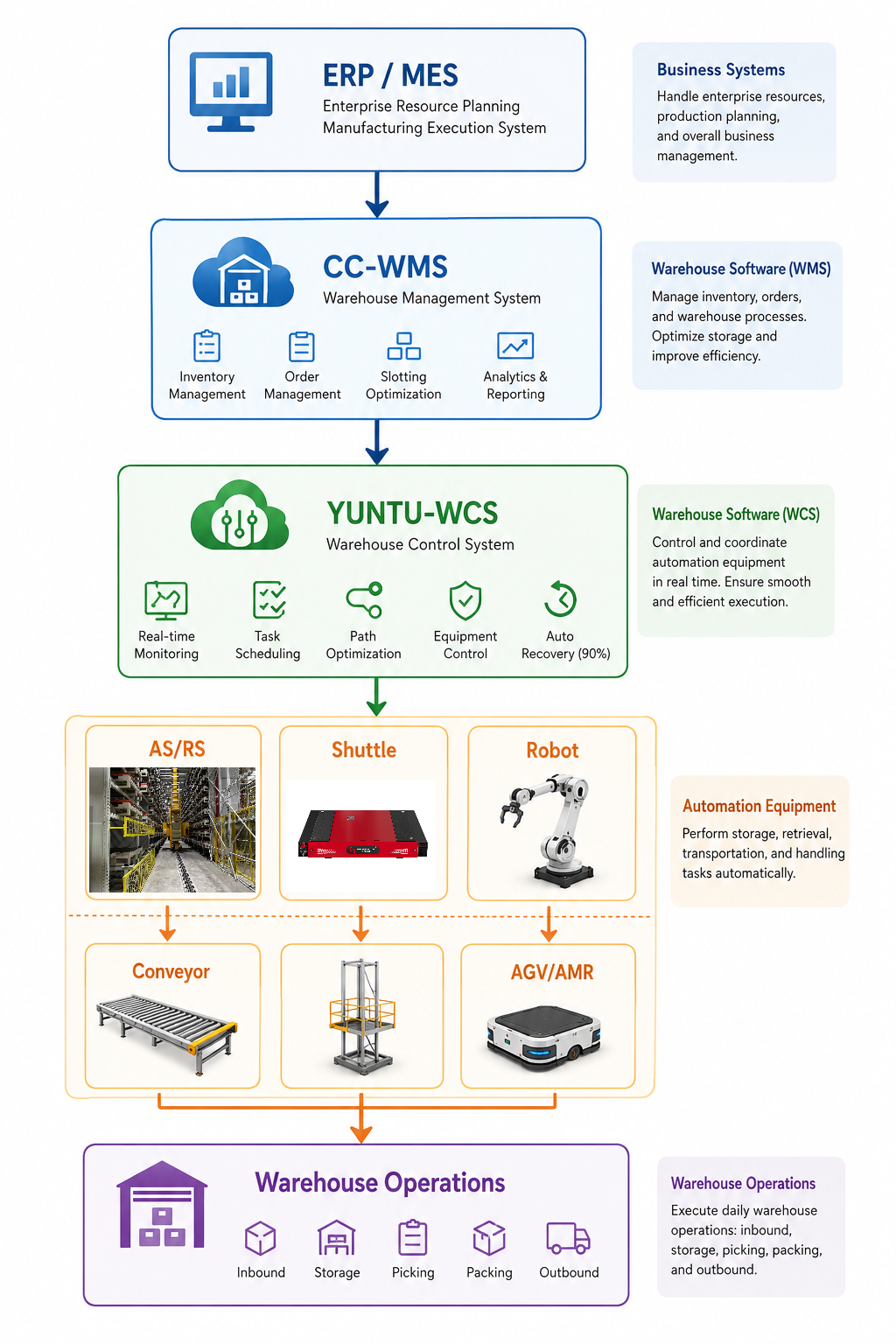
Automated warehouses require coordination between software transactions and physical material movements. A typical architecture may connect ERP or MES with a WMS, followed by a WCS or another equipment-control layer and the relevant automation equipment.
The systems generally have different responsibilities:
-
WMS: Manages warehouse inventory, locations, allocation, and operational workflows.
-
WCS or equipment-control layer: Coordinates physical equipment tasks and execution, depending on the system architecture.
-
Automation equipment: Performs storage, retrieval, transportation, and other physical handling operations.
For facilities using four-way shuttles, AS/RS, conveyors, or lifts, verify equipment compatibility, task confirmation, inventory synchronization, and exception handling during solution design.
The goal is to ensure that the warehouse's digital inventory records remain consistent with physical operations. A WMS should therefore be evaluated as part of the complete warehouse solution rather than in isolation.
7. What Is an Advanced Warehouse Management System?
An advanced warehouse management system goes beyond basic inventory recording by supporting more complex warehouse rules, detailed traceability, advanced task management, analytics, and integration with automated material-handling equipment.
Depending on the product and configuration, advanced capabilities may include the following.
7.1 Advanced Slotting and Location Optimization
Advanced slotting can recommend storage locations based on product characteristics, demand patterns, replenishment needs, and operational constraints.
The goal is to reduce unnecessary travel, support efficient picking, and use available storage capacity more effectively. The value of slotting depends on reliable data and the ability to execute the recommended changes.
7.2 Wave and Batch Planning
Wave planning groups warehouse tasks according to factors such as dispatch schedules, order priorities, or operational capacity. Batch picking combines suitable orders to reduce repeated travel.
These approaches can improve workflow coordination when order profiles and warehouse layouts support them.
7.3 Lot, Batch, and Serial-Number Traceability
For businesses that require detailed product traceability, an advanced WMS may manage lot numbers, serial numbers, expiration dates, or other inventory attributes.
The system should support the relevant receiving, storage, picking, and dispatch rules so that traceability is maintained across warehouse transactions.
7.4 Multi-Warehouse Management
Some systems support inventory visibility and operational processes across multiple warehouses or distribution centers.
Businesses should confirm how the software handles site-specific rules, stock transfers, user permissions, reporting, and data synchronization.
7.5 Automation Integration
An advanced WMS may exchange warehouse tasks and status information with a WCS, AS/RS, shuttle systems, conveyors, and mobile robots through supported interfaces.
The exact functions depend on the software and system architecture. Buyers should verify equipment compatibility, task sequencing, transaction confirmation, and exception recovery.
7.6 Advanced Reporting and Analytics
Advanced reporting may provide detailed analysis of inventory, order fulfillment, task execution, capacity, and operational exceptions.
Useful analytics depend on accurate event records, consistent KPI definitions, and reports that support actionable decisions rather than simply displaying large amounts of data.
7.7 AI-Assisted Functions
Some warehouse software products offer or integrate AI-assisted forecasting, slotting recommendations, anomaly detection, or task-planning support.
These capabilities should be evaluated individually. AI functionality is not automatically included in every advanced WMS, and recommendations must be validated against actual operational constraints and data quality.
An advanced WMS is most valuable when its additional capabilities solve identifiable operational problems. Businesses should evaluate the feature set, data requirements, integration effort, and measurable business value before investing in more complex software.
8. WMS vs. ERP vs. WCS
These systems can work together, but they generally serve different operational purposes.
| System | Primary role | Typical responsibilities |
| ERP | Enterprise business management | Purchasing, sales, finance, production planning, and business-level inventory records |
| WMS | Warehouse operations and inventory workflows | Warehouse locations, receiving, putaway, replenishment, picking, and inventory transactions |
| WCS | Automation equipment coordination | Equipment task coordination, material-flow execution, and connected-device status, depending on architecture |
| WES or execution functions | Operational execution and optimization, where deployed | Task sequencing, workload balancing, or coordination between warehouse activities |
A simplified architecture is:
ERP → WMS → WCS or equipment-control layer → AS/RS, shuttles, conveyors, and robots
The actual design may differ. Some products combine functions, and some facilities use an additional execution layer.
The key requirement is a clear division of responsibilities. Each system should have defined ownership of inventory transactions, warehouse tasks, equipment commands, task completion, and exception recovery.
9. Benefits of Implementing a WMS
Improved Inventory Visibility
A WMS maintains structured records of stock quantities, locations, and relevant attributes. When physical movements are captured promptly and correctly, teams can make decisions using more reliable inventory information.
Better Order Fulfillment
Task allocation, location management, replenishment, and picking workflows can help reduce avoidable travel and process errors.
Actual improvement depends on the initial process, warehouse layout, order profile, and implementation quality.
More Efficient Warehouse Operations
A WMS can standardize workflows and make outstanding tasks and exceptions more visible. Managers can use operational data to identify bottlenecks and adjust procedures.
Stronger Traceability
Lot, batch, serial-number, and expiration-date tracking can support traceability when these attributes are captured and maintained correctly.
Support for Warehouse Automation
A WMS can provide inventory and task information to connected automation systems. This helps link warehouse business requirements with physical material movement.
Successful automation still requires compatible equipment, control software, interface design, and validated operating procedures.
Better Operational Decision-Making
Reports on inventory, orders, and task performance can support capacity planning and continuous improvement. Useful analytics depend on accurate data and well-defined KPIs.
10. How to Choose the Right WMS
Step 1: Define Business and Operational Requirements
Document current warehouse processes, product characteristics, SKU count, order volume, storage rules, inventory attributes, and future growth expectations.
Distinguish essential requirements from optional features so that software evaluation remains focused.
Step 2: Assess Warehouse Complexity
A small warehouse with simple storage and picking workflows may not require the same functionality as a multi-site distribution network or high-density automated facility.
Evaluate the number of locations, warehouse zones, order channels, operating shifts, and the complexity of inventory and fulfillment rules.
Step 3: Verify Integration Capabilities
Confirm how the WMS exchanges data with ERP, MES, order management, transportation systems, scanners, and automation controls.
Ask about supported interfaces, message formats, data ownership, error handling, monitoring, and recovery after communication interruptions.
Step 4: Evaluate Usability and Configuration
Warehouse staff need clear instructions and practical interfaces. Review mobile workflows, scanning steps, exception handling, user permissions, and the effort required to maintain business rules.
Demonstrations should use realistic warehouse scenarios rather than only standard feature presentations.
Step 5: Review Reporting and KPIs
Determine whether the system can produce the reports and operational metrics required by warehouse managers.
Confirm how each metric is calculated and whether the underlying data is available at the required level of detail.
Step 6: Consider Deployment, Support, and Total Cost
Assess licensing or subscription costs, implementation, integration, infrastructure, training, support, upgrades, and future expansion.
The lowest initial price may not represent the lowest lifecycle cost if substantial customization or ongoing integration work is required.
Step 7: Test with Realistic Scenarios
Before deployment, validate typical and exceptional workflows, including partial receipts, short picks, inventory discrepancies, blocked locations, equipment faults, and interrupted tasks.
Testing should verify both software behavior and the physical warehouse process.
11. WMS Integration with AS/RS, Four-Way Shuttles, and Other Equipment
In an automated warehouse, the WMS is part of a larger system. It manages warehouse transactions and may initiate tasks, while the relevant control layer coordinates the physical equipment.
Integration with AS/RS
The WMS maintains inventory and location records. The automation-control architecture executes compatible storage and retrieval tasks and reports relevant status information.
The system must define how storage destinations are assigned, how tasks are confirmed, and how exceptions are handled.
Integration with Four-Way Shuttle Systems
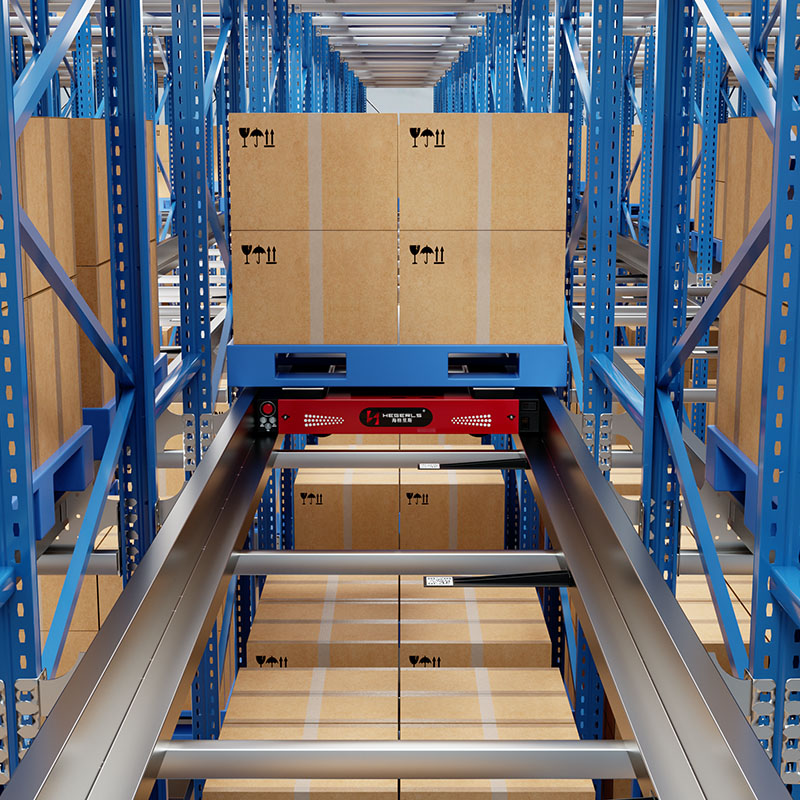
A four-way shuttle warehouse may include shuttles, lifts, conveyors, and transfer stations. The WMS provides warehouse-level inventory and task information, while the applicable WCS or control layer coordinates equipment execution according to the project architecture.
The task-allocation logic and interface responsibilities should be verified during system design.
Integration with Conveyors and Lifts
Conveyors and lifts move goods between process stages or different elevations. The WMS may initiate or track the associated warehouse transaction, while equipment controls manage movement sequences and interlocks.
Correct synchronization helps prevent a task from being treated as complete before the physical transfer is confirmed.
Integration with AGVs and AMRs
When mobile robots transport goods, the warehouse system may provide task information or destinations to a fleet-management or control system.
The integration must define pickup and drop-off confirmation, location mapping, task priorities, and exception handling.
12. How Zhuku Supports Warehouse Management and Automation Integration
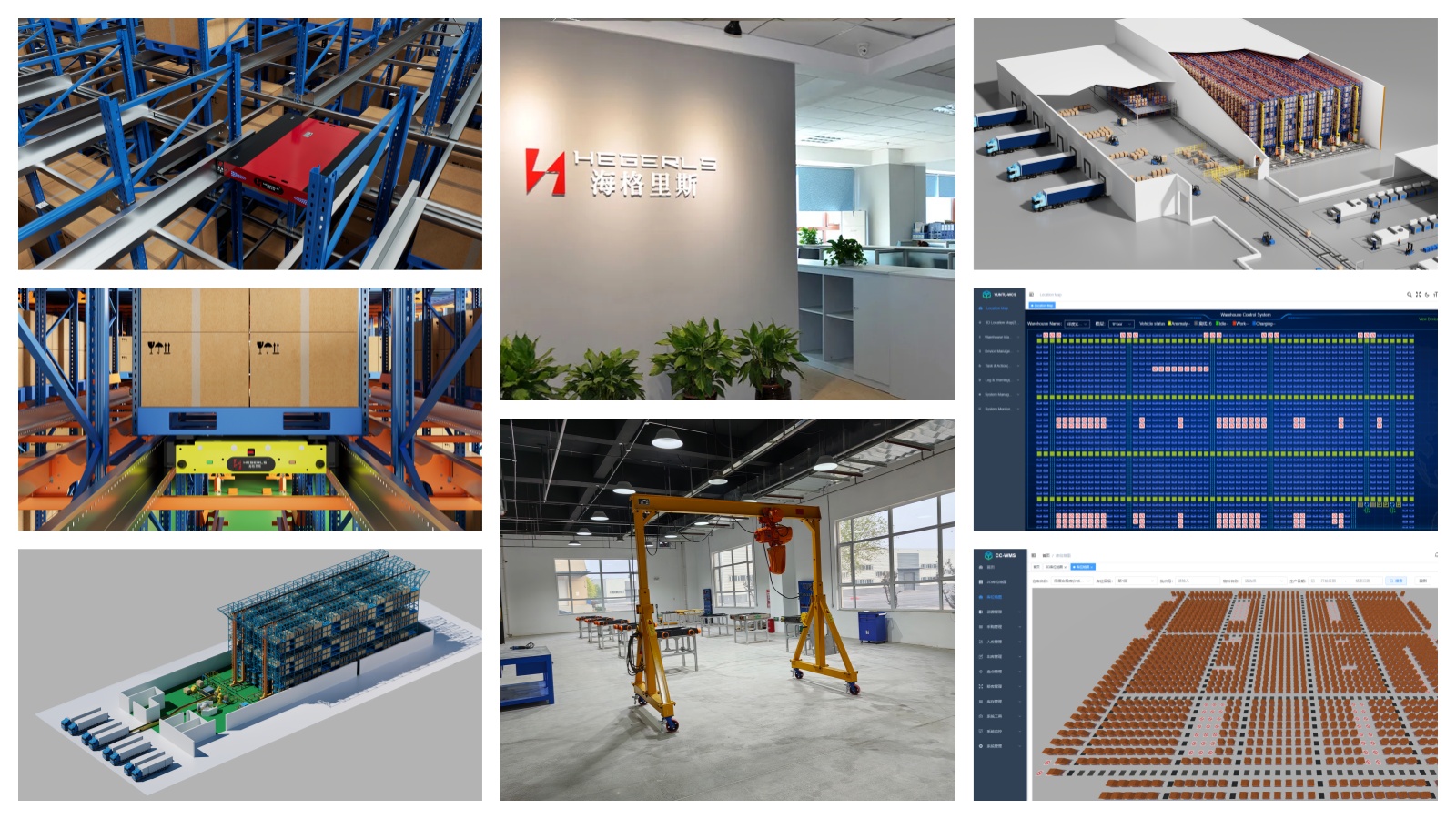
Zhuku (Hebei) Automatic Storage Technology Co., Ltd. provides warehouse automation and integrated storage solutions, including four-way shuttle systems, AS/RS, storage racking, and warehouse software.
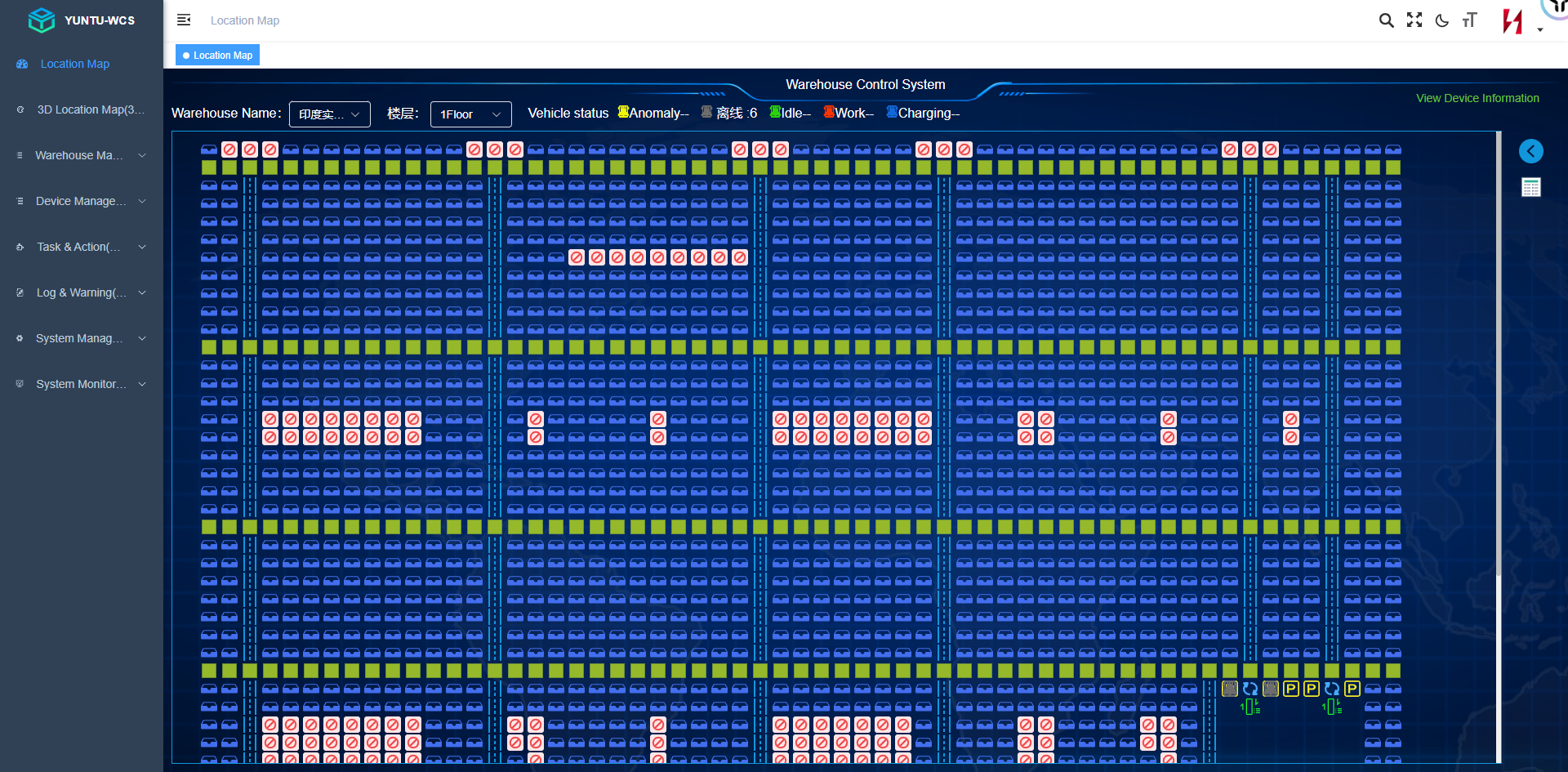
Zhuku's software portfolio includes CC-WMS and YUNTU-WCS. Their suitability and respective responsibilities should be assessed against the requirements of the proposed warehouse architecture, including the equipment to be connected and the required operational workflows.
For a warehouse management project, the evaluation should consider:
-
Inventory and location-management requirements.
-
Receiving, putaway, replenishment, and picking workflows.
-
Storage capacity and equipment configuration.
-
ERP or MES data exchange.
-
WMS and WCS task responsibilities.
-
Equipment interfaces and transaction confirmation.
-
Reporting, exception management, and operational support.
-
Future expansion and lifecycle costs.
The goal is to ensure that warehouse-management processes and physical automation work together through clearly defined transactions and interfaces.
Conclusion
A Warehouse Management System is a key software foundation for managing inventory, locations, warehouse tasks, and fulfillment workflows. It can improve operational visibility, standardize processes, support traceability, and provide the data needed for warehouse automation.
Choosing the right WMS requires more than comparing feature lists or searching for the top WMS management software. Businesses should assess warehouse complexity, integration requirements, usability, reporting, deployment costs, and future growth.
A warehouse management system sample can help clarify how inventory and order workflows operate, while an advanced WMS may offer more sophisticated planning, traceability, analytics, and automation integration. The value of these capabilities depends on whether they address real operational needs.
For automated facilities, the WMS must also fit the wider architecture of AS/RS, shuttle systems, conveyors, lifts, mobile robots, and equipment-control software. A well-defined integration strategy helps ensure that digital warehouse records remain aligned with physical operations.
Planning to implement or upgrade a WMS? Share your warehouse layout in CAD or PDF format, together with SKU data, storage requirements, order volume, throughput targets, and existing ERP or automation details. Zhuku can help evaluate suitable warehouse-management and automation-integration options for your operation.