Real-time inventory management and visibility help businesses monitor stock quantities, storage locations, inventory movements, and order status using continuously updated or event-driven data. By connecting inventory transactions, warehouse management software, identification technologies, and automated material-handling equipment, businesses can make more informed decisions about replenishment, order fulfillment, and warehouse operations.
However, real-time visibility does not simply mean displaying inventory data on a dashboard. Accurate visibility depends on whether physical movements are captured promptly, transactions are validated, systems exchange information reliably, and discrepancies are resolved.
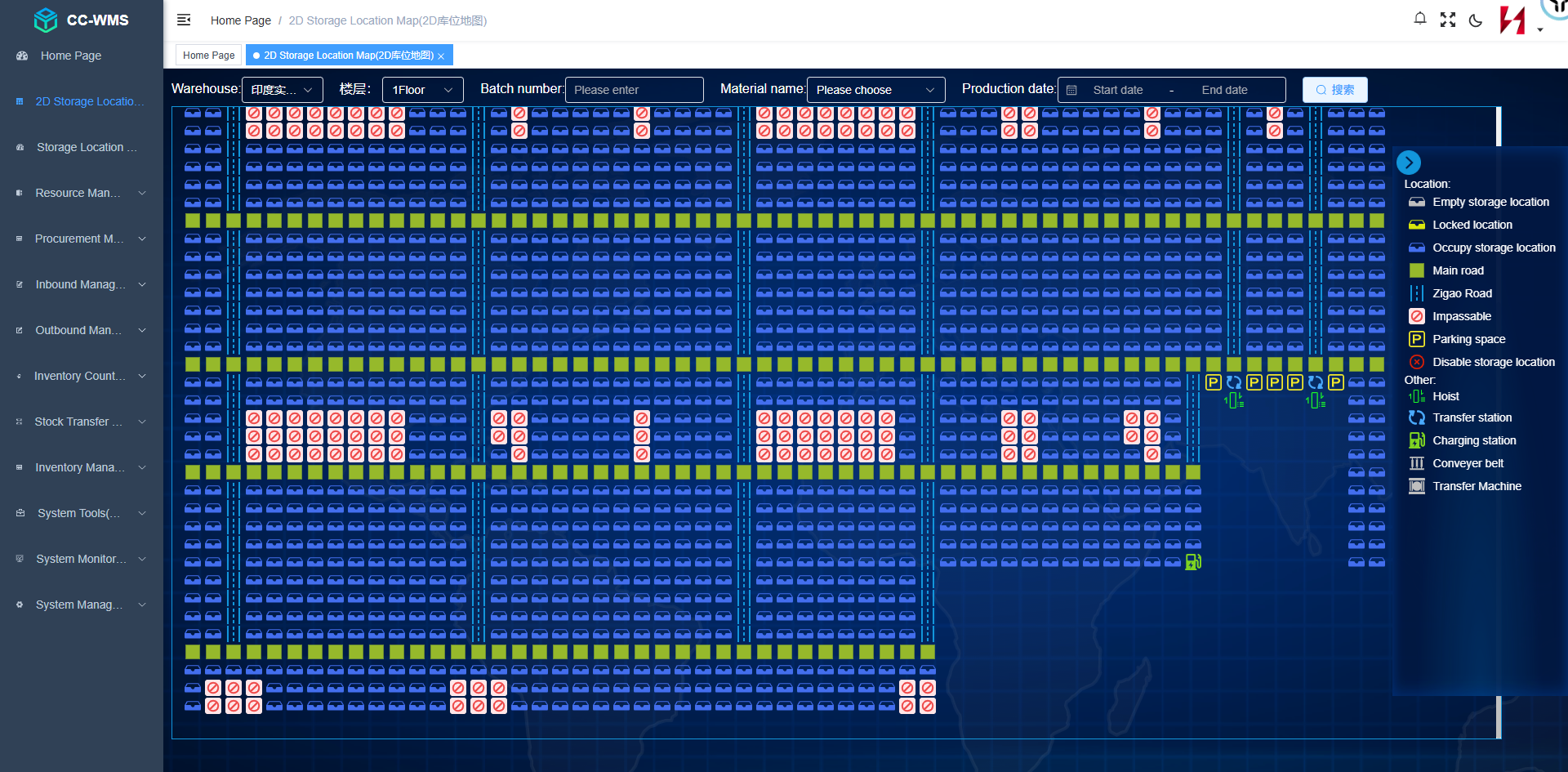
For warehouses handling large SKU portfolios, frequent stock movements, or automated storage operations, these capabilities become especially important. A warehouse management system (WMS) can maintain inventory records, while a warehouse control system (WCS) can coordinate connected equipment and report execution status. Barcode scanners, RFID readers, conveyors, shuttles, and other devices can provide the events needed to connect physical operations with digital records.
This guide explains what real-time inventory management and visibility mean, how they work, which technologies support them, and how to implement an effective solution for manual, semi-automated, and fully automated warehouses.
1. What Is Real-Time Inventory Management and Visibility?
Real-time inventory management is the process of updating and managing inventory records as relevant warehouse transactions occur, subject to the system's processing and communication capabilities.
Real-time inventory visibility is the ability to access current information about stock quantities, locations, status, and movements so that warehouse teams can understand what inventory is available and where it is expected to be.
These concepts are closely related, but they are not identical.
-
Inventory management determines how stock is recorded, allocated, replenished, transferred, and controlled.
-
Inventory visibility makes inventory information accessible for operational decisions.
-
Real-time tracking captures movement or status information as events occur or at frequent intervals.
-
Inventory accuracy measures how closely recorded stock information matches the physical inventory.
A system can display inventory data in real time while still containing incorrect records if a movement is missed, a scan is associated with the wrong item, or an incomplete transaction is incorrectly confirmed.
Effective real-time inventory management therefore combines timely data, accurate identification, reliable transaction processing, and appropriate exception handling.
2. Why Is Real-Time Inventory Visibility Important?
Traditional inventory management can rely on periodic counts, spreadsheets, delayed transaction entry, or information distributed across disconnected systems. These methods may be sufficient for simple operations, but they can make it difficult to respond quickly when stock levels and warehouse activities change frequently.
Real-time visibility helps address several operational challenges.
Better Stock Availability Information
When receiving, putaway, transfers, picking, and dispatch are recorded promptly, teams can make decisions using more current inventory information.
This helps reduce uncertainty when checking stock availability, allocating orders, or planning replenishment.
Fewer Inventory-Related Delays
Incorrect location records can force employees to search for stock or investigate discrepancies before completing an order.
Reliable location and transaction information helps reduce unnecessary searching and supports more predictable fulfillment.
More Informed Replenishment Decisions
Inventory visibility can help identify when stock at a picking location is running low or when replenishment is required.
A WMS may use configurable thresholds, order demand, and available inventory to create replenishment tasks. The quality of these decisions depends on accurate stock records and appropriate business rules.
Better Coordination Across Departments
Warehouse operations often interact with procurement, production, sales, customer service, and transportation.
Connected inventory information can help these teams work from a more consistent view of stock availability and order progress, provided the relevant systems exchange data correctly.
Faster Exception Identification
Current inventory records and operational dashboards can help reveal unusual stock changes, incomplete movements, and discrepancies.
Earlier identification makes it easier to investigate issues before they affect more orders or processes.
3. How Does Real-Time Inventory Management Work?
A typical real-time inventory workflow connects physical goods, identification events, warehouse transactions, software records, and operational reporting.
Step 1: Establish Inventory and Location Records
Each SKU, pallet, tote, or other tracked handling unit is associated with an identifier. Storage areas are assigned consistent location codes, such as warehouse zones, aisles, rack levels, and individual storage positions.
The level of identification depends on the business requirement. Some warehouses track quantities by SKU and bin, while others also require pallet-level, batch-level, lot-level, or serial-number traceability.
Step 2: Capture Inventory Events
When goods arrive, move, or leave the warehouse, the system captures the relevant event through an appropriate method.
Examples include:
-
Barcode scanning during receiving.
-
RFID reads at designated checkpoints.
-
Confirmation of putaway or picking tasks.
-
Sensors or equipment messages associated with material movement.
-
Inventory adjustment or cycle-count transactions.
The system must establish what the event represents. A reader detecting a tag, for example, does not necessarily prove that the item has been received into available stock.
Step 3: Validate the Transaction
Before updating inventory, the system applies relevant business rules.
These may check the item identifier, expected quantity, source and destination locations, task authorization, and transaction status.
Validation helps prevent duplicate movements, invalid locations, and inconsistent stock records.
Step 4: Update Inventory and Location Records
Once the transaction is accepted, the WMS or designated inventory system updates the relevant records.
Depending on the operation, this may involve increasing received stock, transferring inventory between locations, reducing picked quantities, or changing an item's status.
The timing of the update depends on system configuration, interface performance, and the event-confirmation process.
Step 5: Display Current Inventory Information
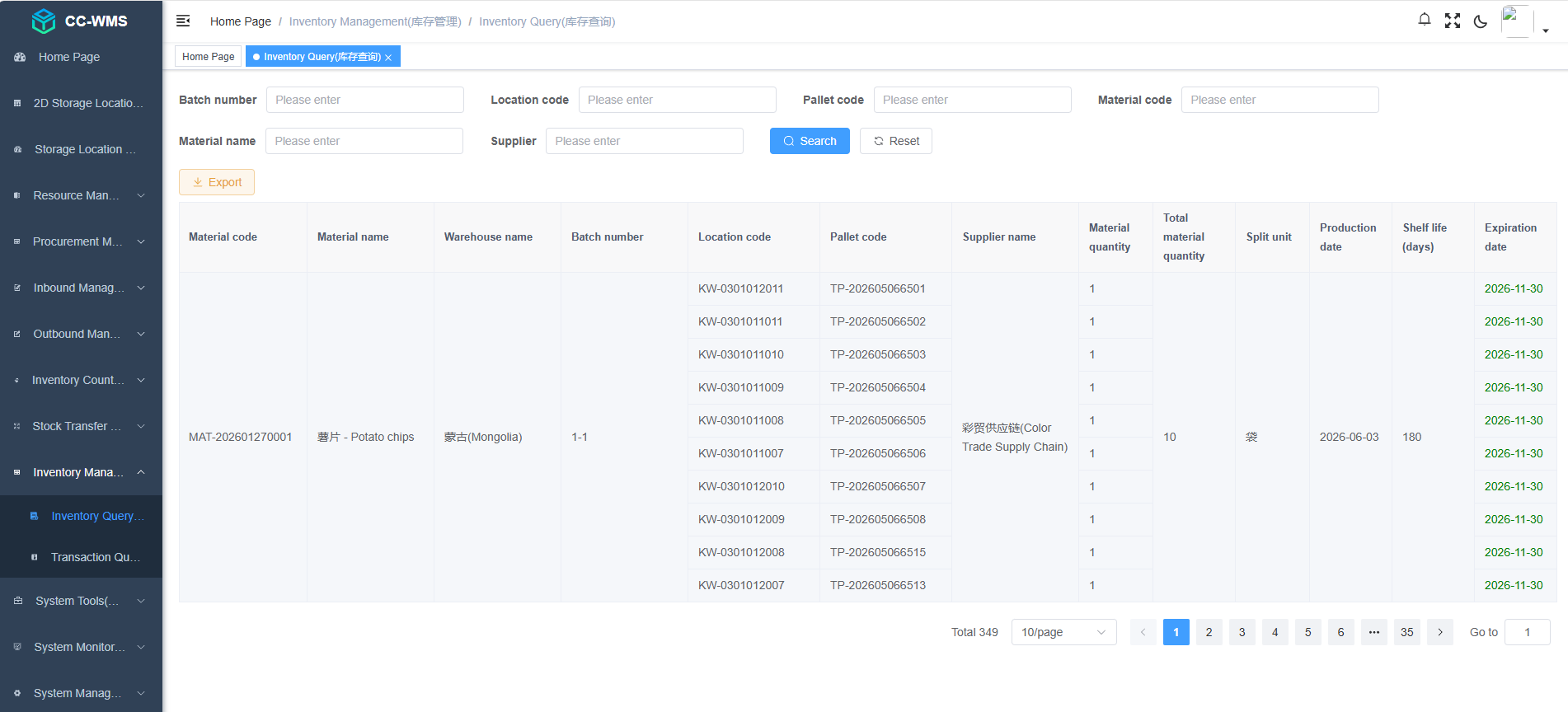
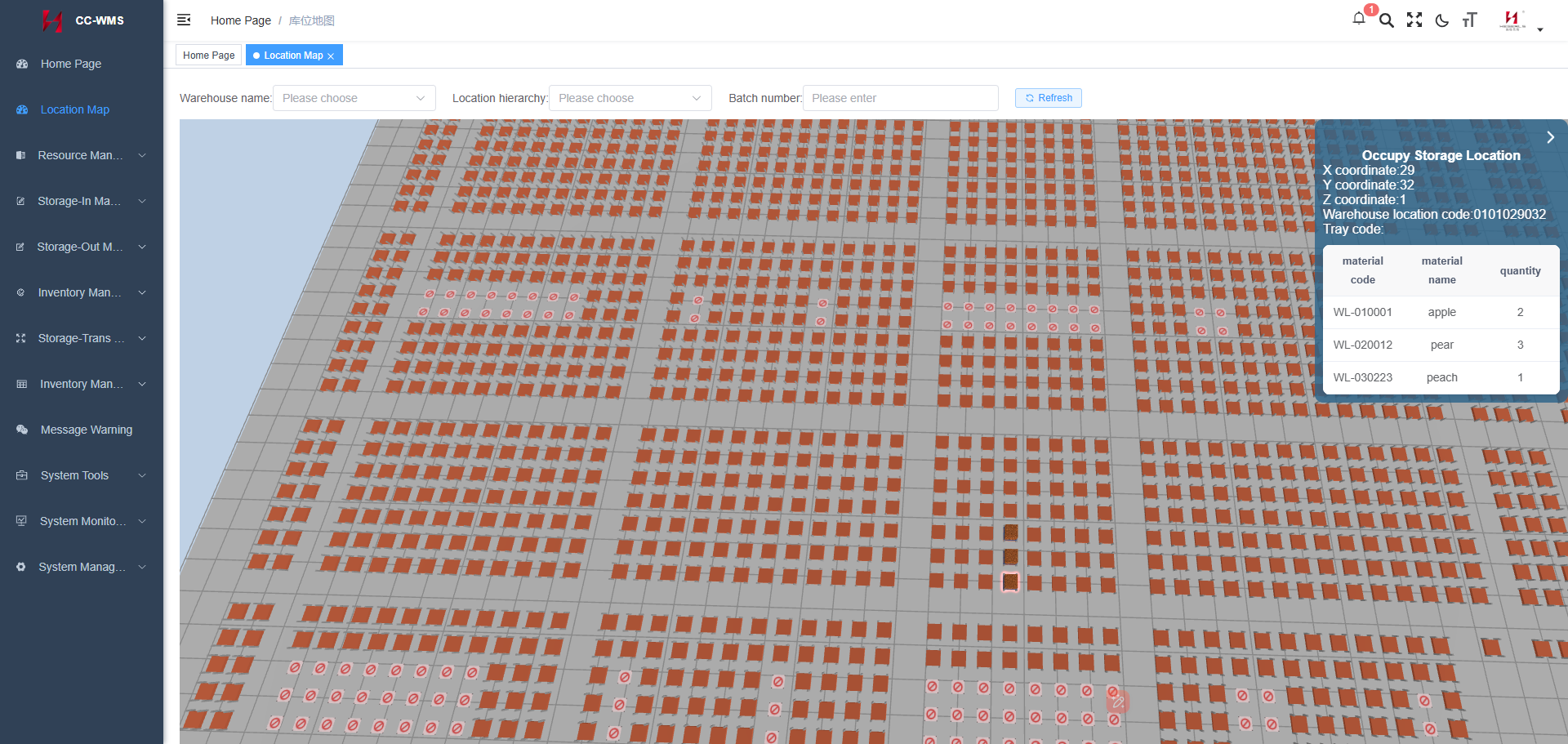
Dashboards, inventory inquiries, operational reports, and alerts make the updated information available to authorized users.
Useful information may include current recorded quantities, available stock, reserved inventory, storage locations, pending movements, and unresolved exceptions.
Step 6: Reconcile Exceptions
When physical events and system records do not match, the system should support investigation and correction.
For example, a failed putaway task may require the inventory record to remain in an appropriate pending or intermediate state until the actual location is confirmed.
This step is essential because timely data alone cannot guarantee correct inventory.
4. Key Technologies for Real-Time Inventory Visibility
Real-time inventory management is usually supported by several technologies working together rather than by a single device or software application.
Warehouse Management Systems (WMS)
A WMS is generally the central software platform for warehouse inventory records and operational transactions.
Typical functions include:
-
Receiving and putaway management.
-
Storage-location and inventory management.
-
Order allocation and picking.
-
Replenishment and stock transfers.
-
Cycle counting and inventory adjustments.
-
Batch, lot, or serial-number traceability where configured.
-
Inventory and operational reporting.
The WMS maintains the business view of inventory. Its accuracy depends on transaction completeness, master data quality, validation rules, and synchronization with connected systems.
Barcode and QR Code Scanning
Barcode-based identification is widely used to capture inventory events at receiving, storage, picking, packing, and dispatch.
QR codes can encode additional information compared with many one-dimensional barcode formats, but both depend on optical scanning and readable labels.
These technologies are often a practical choice when warehouses need reliable transaction-based updates without the infrastructure associated with more complex positioning systems.
RFID Technology
RFID uses radio-frequency communication to identify compatible tagged items.
Depending on the tag, reader, and environment, RFID can support automated identification at selected checkpoints and may reduce the need for individual line-of-sight scans.
However, an RFID read does not always establish an item's exact location or prove that a complete warehouse transaction occurred. Reader configuration, tag placement, environmental conditions, and event-processing logic remain important.
Sensors and Connected Equipment
Connected equipment can provide operational events that help link inventory records with physical movements.
For example, a conveyor transfer confirmation, shuttle task completion message, or automated storage retrieval event may be used as part of a warehouse transaction workflow.
The integration must define which system is responsible for confirming the movement and updating the corresponding inventory record.
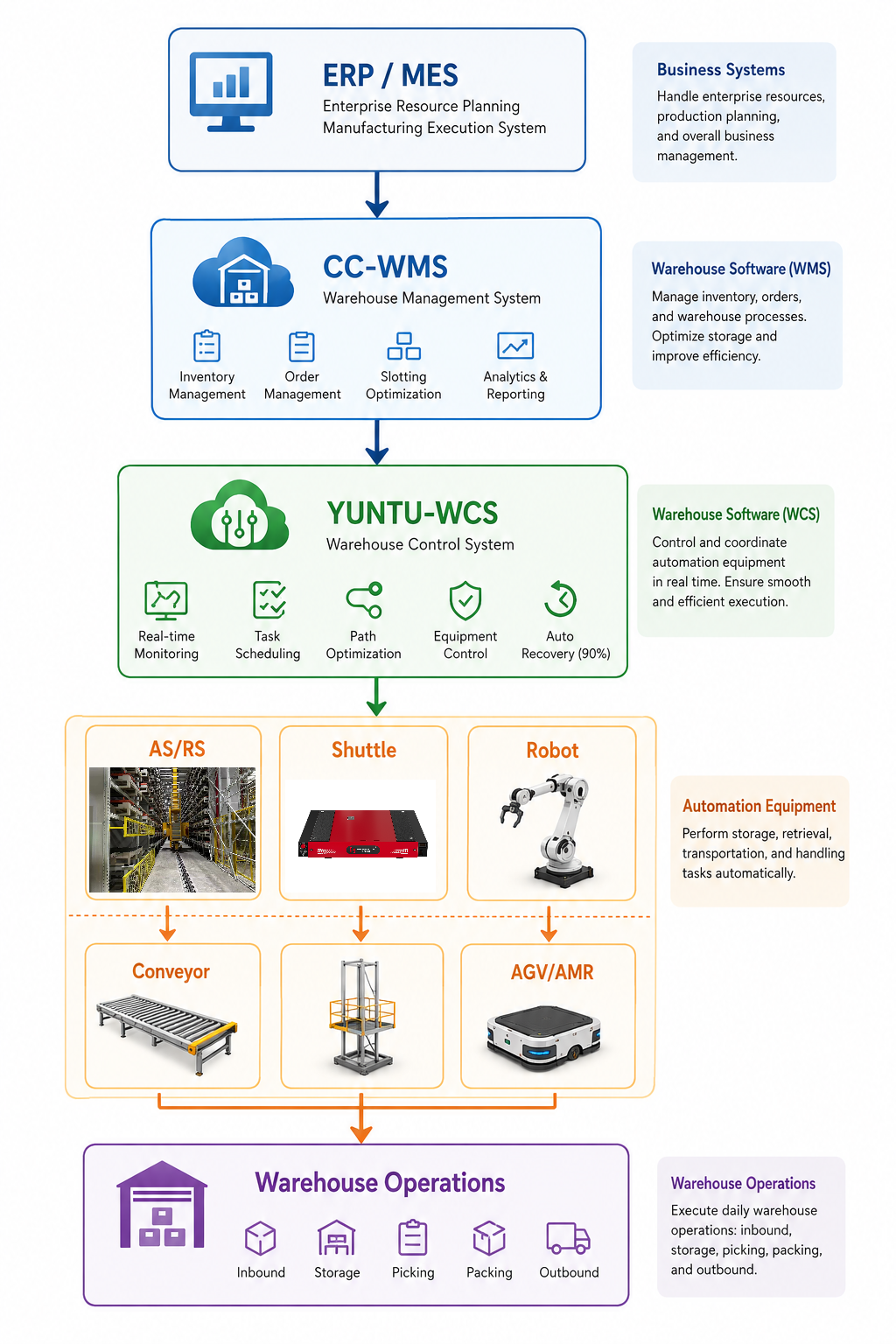
Warehouse Control Systems (WCS)
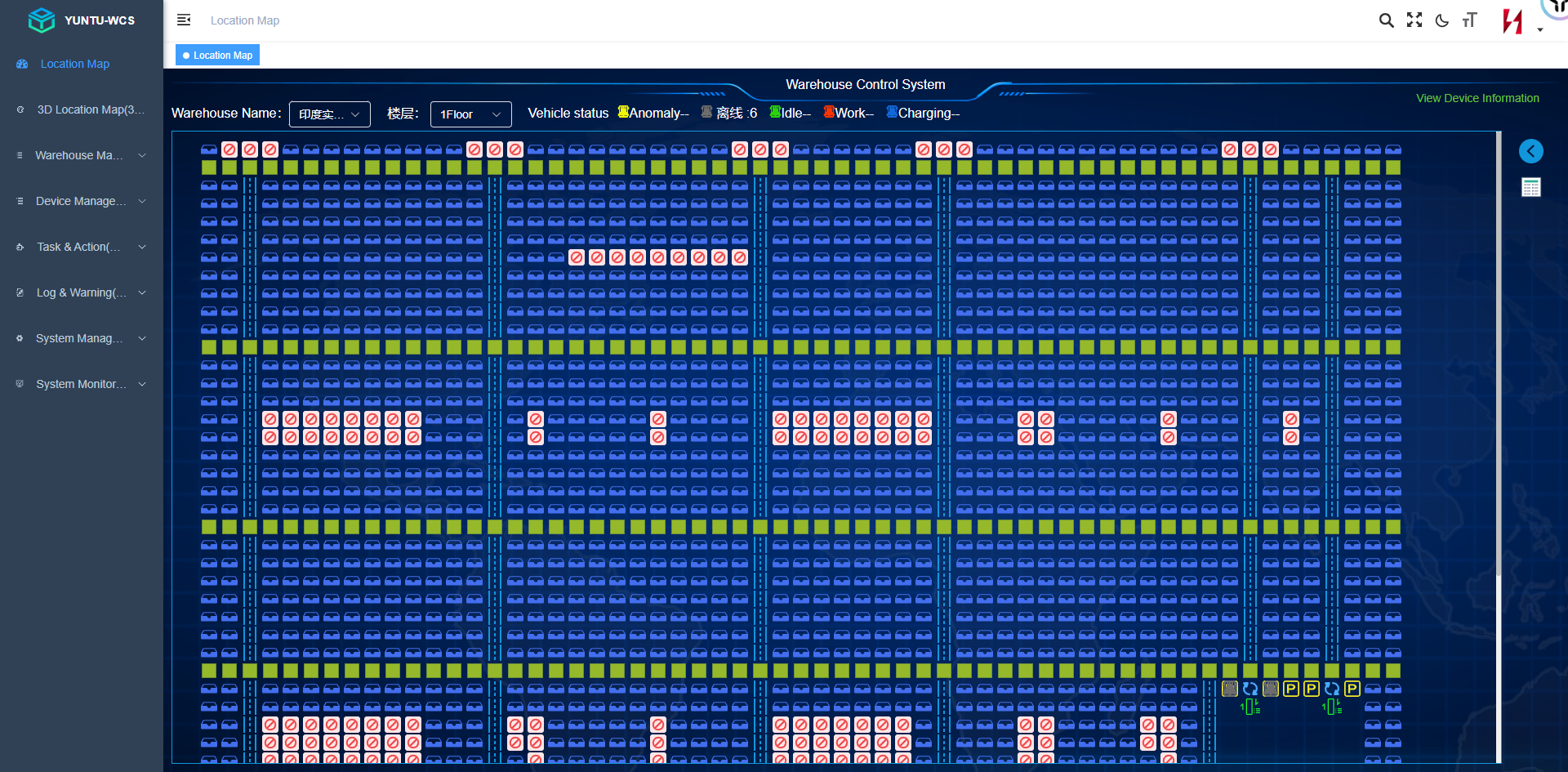
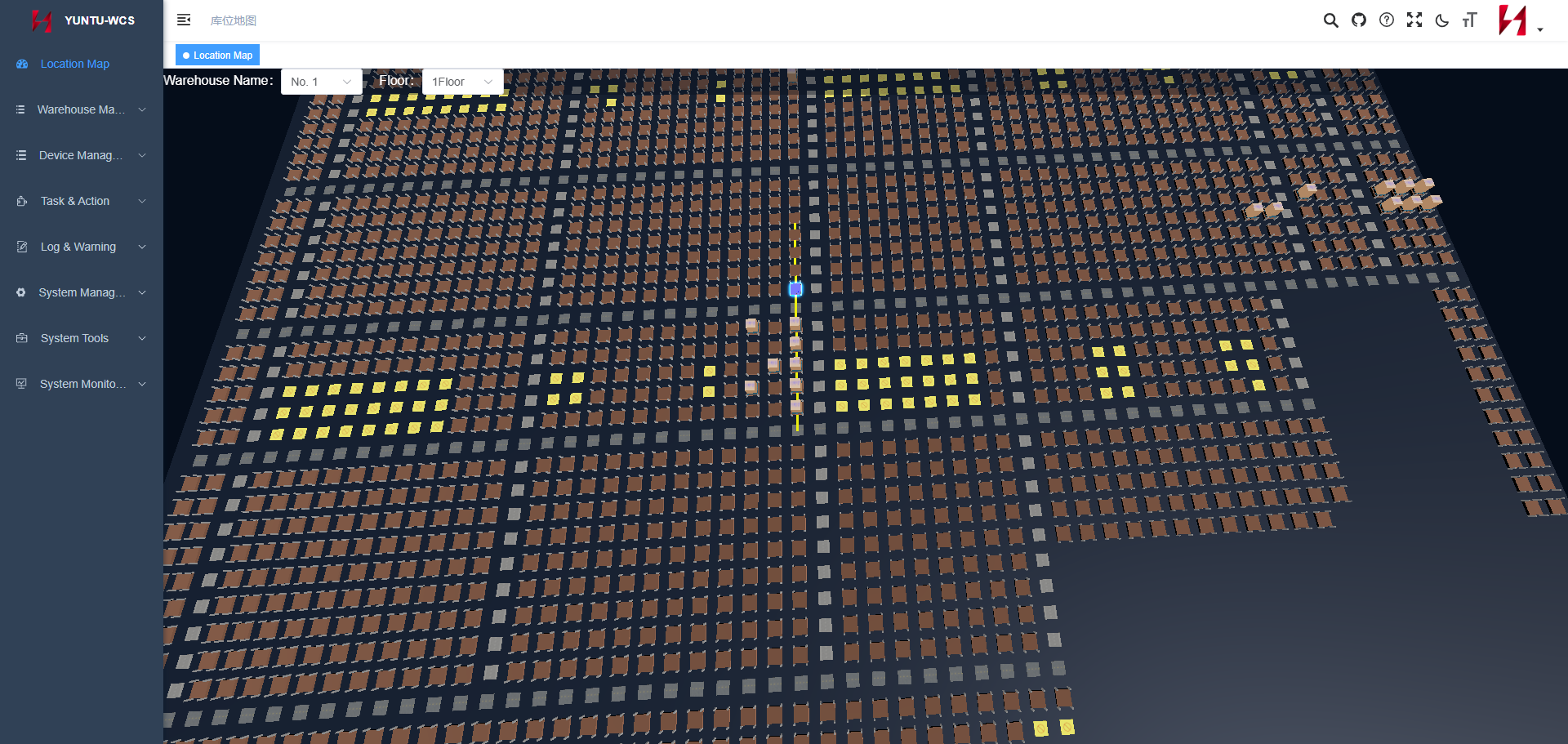
A WCS coordinates connected automation equipment and material-handling operations. Depending on the architecture, it may manage task sequences, monitor equipment states, and report movement progress.
In an automated warehouse, the WCS and WMS serve different but complementary roles: one focuses on equipment execution, while the other generally manages inventory and warehouse business transactions.
Dashboards and Analytics
Dashboards present inventory data in a form that supports operational decisions.
Common indicators include recorded stock quantities, inventory discrepancies, pending receipts, replenishment requirements, order status, and equipment exceptions.
Analytics can help identify recurring patterns and bottlenecks, but conclusions remain dependent on the quality and completeness of the underlying data.
5. Real-Time Inventory Management vs. Traditional Inventory Management
| Comparison factor | Traditional or periodic approach | Real-time or event-driven approach |
| Data updates | May rely on scheduled entry or periodic reconciliation | Updates as validated transactions or events are processed |
| Inventory visibility | May lag behind physical operations | Can provide more current recorded stock information |
| Location inquiries | May require manual investigation | Can use recorded storage-location transactions |
| Replenishment | May rely on periodic review | Can use current records and configured triggers |
| Exception handling | May be identified during later checks | Can be flagged closer to the time of the event |
| System requirements | May use simpler tools and workflows | Requires reliable data capture, processing, and integration |
| Accuracy | Depends on recordkeeping and reconciliation | Still depends on correct identification, transactions, and exception resolution |
The distinction is not simply between manual and automated warehouses. A manual warehouse can use a real-time WMS, while an automated warehouse can still experience inaccurate inventory if transactions are not confirmed properly.
6. Inventory Visibility Across the Warehouse Lifecycle
Real-time visibility should cover the complete inventory lifecycle rather than only the storage stage.
Receiving
When goods arrive, the system records the relevant product identifiers, quantities, and receipt status.
Depending on the process, inventory may initially be recorded as received but not yet available for allocation. Quality inspection, documentation checks, or other requirements may need to be completed first.
Putaway and Storage
The system assigns or confirms storage locations and records completed putaway transactions.
In automated warehouses, equipment execution status may be exchanged with the WCS while the WMS maintains the corresponding inventory and location records.
Replenishment
When picking locations approach a defined threshold, the WMS may create replenishment tasks using configured rules.
Visibility into both reserve stock and picking-location quantities helps the operation plan replenishment without relying solely on manual inspection.
Picking and Order Allocation
Inventory visibility helps the WMS determine which stock is available for orders and which quantities have already been allocated or reserved.
During picking, the system records the relevant item and quantity transactions according to the workflow. This helps prevent the same stock from being allocated or picked incorrectly.
Dispatch
At dispatch, the system records the relevant goods issue or shipment transaction.
The exact point at which stock becomes unavailable for further allocation should be defined in the warehouse's transaction rules.
Returns and Inventory Adjustments
Returned goods may require inspection before becoming available for resale or reuse.
Similarly, damaged stock, expired products, and inventory discrepancies need appropriate status changes and adjustment records. Real-time visibility is most useful when these exceptions are handled consistently.
7. Real-Time Inventory Visibility in Automated Warehouses
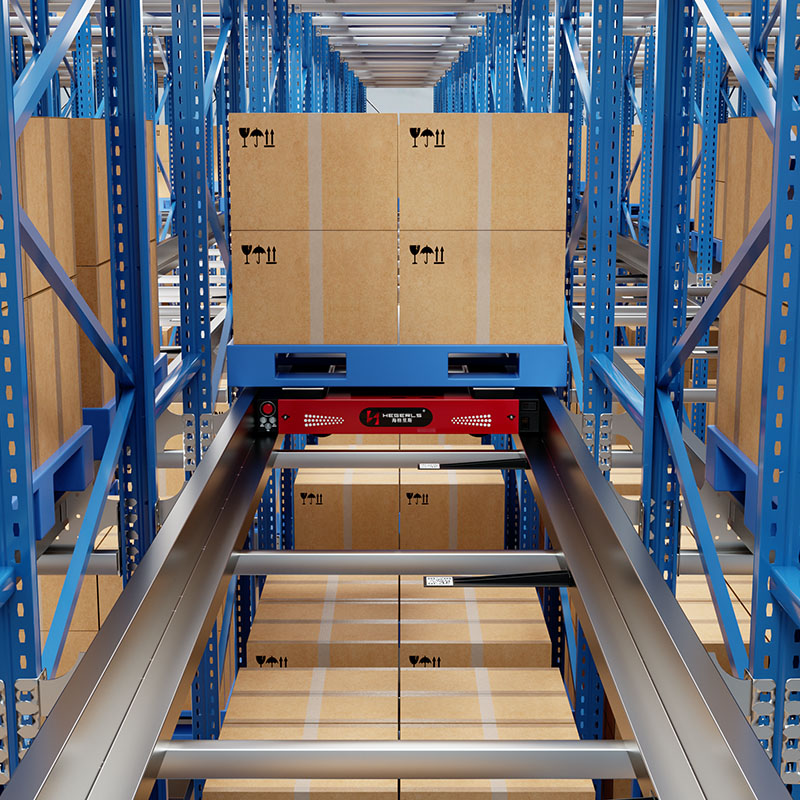
Automated warehouses introduce additional data sources and operational states. Inventory records may need to be coordinated with shuttles, stacker cranes, lifts, conveyors, AGVs, AMRs, and other equipment.
Three categories of information should remain distinct:
Inventory state: What goods are recorded in stock, in what quantity, and at which assigned location?
Equipment state: Which machine is available, operating, charging, or reporting a fault?
Task state: Which movement or retrieval task has been assigned, started, completed, or interrupted?
These states are related but not interchangeable.
Four-Way Shuttle Systems
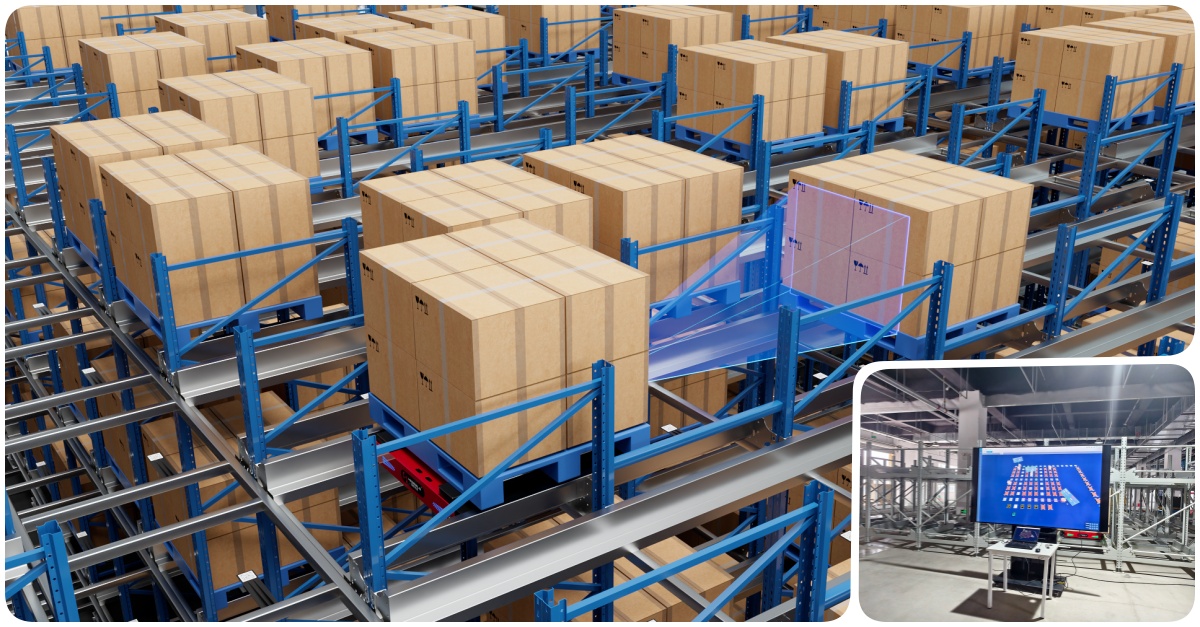
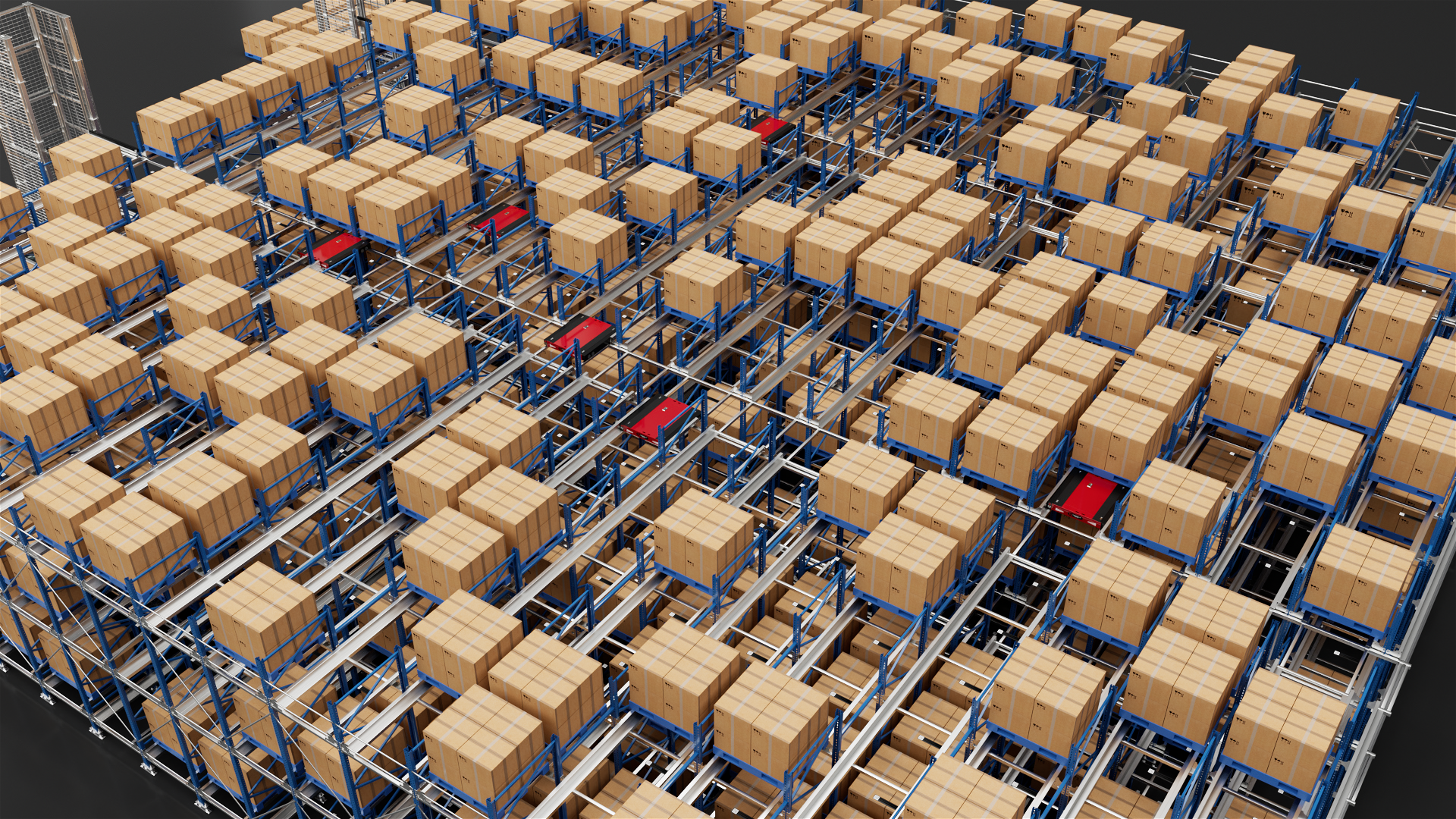
In a four-way shuttle warehouse, inventory visibility may include pallet identifiers, storage addresses, planned movements, and task completion status.
A typical workflow could be:
-
The WMS records the pallet and its inventory attributes.
-
The system assigns an appropriate storage location and initiates the required task.
-
The WCS coordinates the connected shuttle and lift equipment according to the system architecture.
-
Equipment reports task progress or completion.
-
The inventory transaction is confirmed under the configured completion rules.
If a shuttle encounters a fault or the pallet cannot be stored at the expected address, the system should avoid treating the intended movement as successfully completed without appropriate confirmation.
Stacker Crane and AS/RS Systems
In a stacker-crane or other AS/RS installation, inventory visibility may connect the stored load, storage address, retrieval task, equipment status, and completed transfer.
This helps operators understand both the expected stock location and the status of automated operations.
The exact data available depends on the equipment interfaces, sensors, and software architecture.
AGVs, AMRs, and Conveyor Systems
Mobile robots and conveyors can provide task and movement events that help track materials between warehouse areas.
However, knowing that a vehicle reached a destination does not always prove that the correct goods were transferred. Inventory confirmation should use the appropriate load-identification and transaction process.
Why Integration Matters
Without clear integration rules, the physical warehouse and its digital records can become inconsistent.
A robust architecture defines inventory ownership, task acknowledgments, completion confirmation, communication failure handling, and reconciliation procedures between the WMS, WCS, and equipment controllers.
8. Common Challenges in Real-Time Inventory Management
Inaccurate Initial Inventory Data
If starting stock quantities, SKU attributes, or storage locations are incorrect, real-time processing may simply update inaccurate information more quickly.
Recommended approach: Validate opening inventory, standardize item identifiers, review storage-location records, and establish reliable master data before implementation.
Missing or Incorrect Transaction Events
Goods may move without a required scan, or an event may be recorded against the wrong item or location.
Recommended approach: Define transaction checkpoints, validate identifiers and destinations, train operators, and monitor incomplete or inconsistent transactions.
Delayed System Synchronization
When systems exchange data through interfaces, delays or failed messages may cause different applications to show different states.
Recommended approach: Define interface responsibilities, acknowledgment rules, retry mechanisms, and reconciliation procedures. Monitor transaction latency and failed-message queues where supported.
Duplicate Transactions
Repeated scans or messages can create incorrect stock movements if the system processes them more than once.
Recommended approach: Use appropriate transaction identifiers, duplicate-event controls, validation logic, and exception reporting.
Unconfirmed Automated Movements
A system may issue a task but fail to confirm whether the physical movement occurred.
Recommended approach: Distinguish task assignment from execution and completion. Define the required equipment feedback and recovery procedure before updating the inventory record.
Too Much Data Without Useful Decisions
A dashboard may display many measurements without helping operators determine what action to take.
Recommended approach: Prioritize actionable indicators, such as stock discrepancies, low inventory, overdue replenishment, blocked movements, and orders at risk.
9. How to Implement Real-Time Inventory Management
Step 1: Define the Business Objectives
Determine whether the main goal is improved inventory accuracy, better stock availability, reduced search time, faster replenishment, improved traceability, or more reliable automated operations.
Establish measurable baseline indicators before selecting the technology.
Step 2: Map Inventory and Material Flows
Document receiving, putaway, transfers, replenishment, picking, packing, dispatch, and returns.
Identify where information is currently captured, where delays occur, and where physical movements are not reliably reflected in the system.
Step 3: Standardize Identifiers and Locations
Create consistent SKU, handling-unit, and storage-location identifiers.
Define how batch, lot, serial-number, expiry-date, and stock-status information should be captured when required by the business.
Step 4: Select Suitable Data-Capture Methods
Choose barcode scanning, RFID, sensors, or equipment interfaces according to the required workflow.
The objective is to capture reliable events at the right points—not to deploy the most complex technology available.
Step 5: Configure the WMS and Integration Architecture
Define inventory transaction rules, stock statuses, location management, task confirmation, and system responsibilities.
For automated warehouses, confirm how the WMS exchanges data with the WCS, equipment controllers, and any additional robot or fleet-management platform.
Step 6: Design Exception Handling
Establish procedures for missing goods, invalid locations, incomplete movements, communication failures, duplicate events, and physical inventory discrepancies.
Define who investigates each exception and how corrected information is recorded.
Step 7: Pilot and Validate
Test representative products, transactions, storage areas, and operating conditions.
Measure transaction completeness, inventory accuracy, data-update latency, exception rates, and the time required to resolve discrepancies.
Step 8: Monitor and Improve
Review inventory discrepancies, failed transactions, delayed updates, and recurring process issues.
Use these findings to improve scanning discipline, software configuration, integration reliability, and warehouse procedures.
10. Key Metrics for Real-Time Inventory Visibility
The following metrics help assess whether a real-time inventory system is delivering operational value.
| KPI | What it measures | Why it matters |
| Inventory record accuracy | Agreement between recorded and physically verified inventory | Indicates inventory data reliability |
| Transaction completeness | Proportion of required transactions recorded successfully | Helps identify missing movement records |
| Inventory update latency | Time between a relevant event and its availability in the target system | Measures timeliness of visibility |
| Location accuracy | Agreement between recorded and verified storage locations | Supports retrieval and picking reliability |
| Stockout frequency | How often required stock is unavailable when needed | Helps assess stock availability and replenishment |
| Replenishment response time | Time from a replenishment trigger to the relevant completed action | Indicates responsiveness of replenishment workflows |
| Exception resolution time | Time required to investigate and resolve inventory or transaction issues | Measures operational recovery |
| Order fulfillment accuracy | Agreement between order requirements and shipped goods | Connects inventory visibility with customer outcomes |
Metric definitions should be standardized. For example, inventory record accuracy can be measured at the SKU, location, handling-unit, or line-item level, and the result may differ depending on the counting method.
Likewise, update latency should specify which event starts the measurement and which system's confirmation marks the end.
11. How to Choose the Right Inventory Visibility Solution
Different warehouses need different levels of data capture, integration, and automation.
| Warehouse environment | Common requirements | Potential solution |
| Small manual warehouse | Basic stock quantities and bin locations | Barcode scanning with a WMS |
| E-commerce fulfillment | Frequent stock changes and order allocation | WMS, barcode workflows, and suitable picking integration |
| Manufacturing warehouse | Material traceability and production replenishment | WMS integration with ERP or MES |
| Reusable pallet or tote operation | Automated identification at selected checkpoints | Barcode or RFID, depending on the use case |
| High-density automated warehouse | Inventory locations and equipment task status | WMS/WCS integration with AS/RS or shuttle equipment |
| Multi-zone distribution center | Coordinated stock visibility across receiving, storage, picking, and dispatch | Integrated inventory and material-flow architecture |
| Cold-storage warehouse | Reliable identification and inventory records in low temperatures | Environment-suitable labels, devices, and software workflows |
A smaller warehouse may achieve its objectives with disciplined barcode transactions and a suitable WMS. A high-throughput automated warehouse may require additional equipment feedback, interfaces, and exception-management capabilities.
The most appropriate solution is the simplest architecture that reliably meets the operational requirements while allowing for expected growth.
Why Choose Zhuku for Real-Time Inventory Visibility and Warehouse Automation?
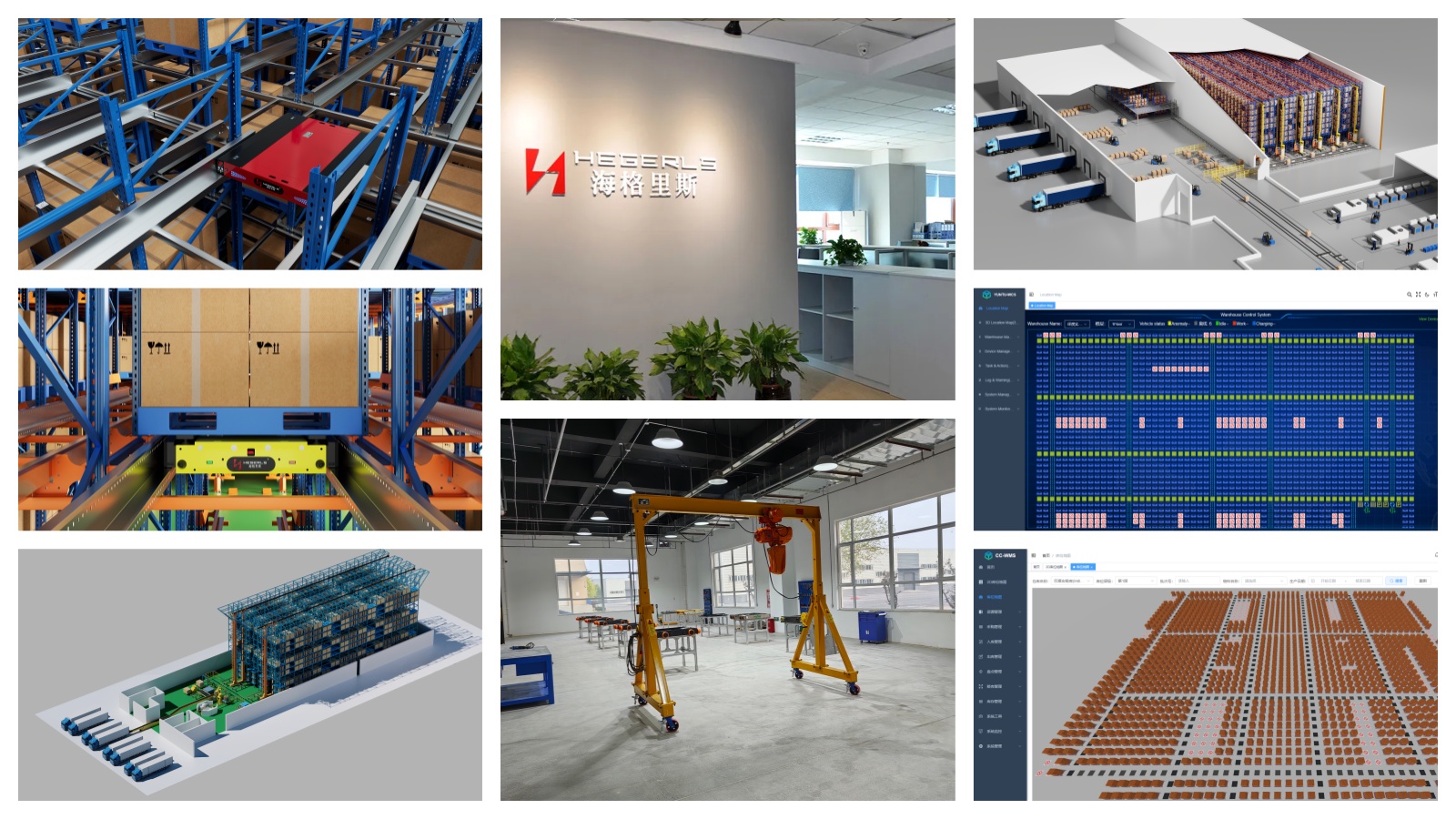
Zhuku (Hebei) Automatic Storage Technology Co., Ltd. provides warehouse automation and integrated storage solutions, including four-way shuttle systems, automated storage and retrieval systems, storage racking, and warehouse software.
For projects that require improved inventory visibility, the key is to connect inventory records with storage locations, material movements, and equipment execution.
Zhuku's CC-WMS and YUNTU-WCS software portfolio can be considered within a project-specific architecture, subject to the required functionality, supported interfaces, and equipment compatibility.
A warehouse assessment should examine:
-
Inventory identification and storage-location requirements.
-
Receiving, putaway, replenishment, picking, and dispatch workflows.
-
The role of WMS, WCS, and connected equipment.
-
Data synchronization, transaction confirmation, and exception handling.
-
Visibility requirements for shuttles, stacker cranes, conveyors, and mobile robots.
-
Inventory accuracy, update latency, and other measurable performance objectives.
The goal is to establish a reliable connection between physical inventory and digital warehouse records, allowing teams to make decisions using timely and trustworthy information.
Conclusion
Real-time inventory management and visibility help businesses understand what stock is recorded, where it is expected to be, and how inventory changes as warehouse transactions occur.
Barcode scanning, RFID, sensors, WMS, WCS, and automated storage equipment can all contribute to this process. Their value depends on how well they capture, validate, and synchronize the information required by warehouse operations.
A successful implementation requires more than a real-time dashboard. It needs accurate master data, consistent transaction rules, reliable system integration, and clear procedures for resolving discrepancies.
For automated warehouses, connecting inventory records with equipment task status is especially important. When these functions are designed together, businesses can improve operational visibility and establish a stronger foundation for efficient warehouse automation.
Planning to improve inventory visibility or integrate inventory management with an automated warehouse? Share your warehouse layout in CAD or PDF format, together with SKU and pallet information, storage requirements, material-flow processes, and current inventory challenges. Zhuku can help evaluate suitable warehouse automation and software integration options for your operation.